Getting Started with AI Agents — Making LLMs Act with the ReAct Pattern
Understand the foundational ReAct pattern. The difference between chatbots and agents, the Thought-Action-Observation loop, and why ReAct falls short in production.
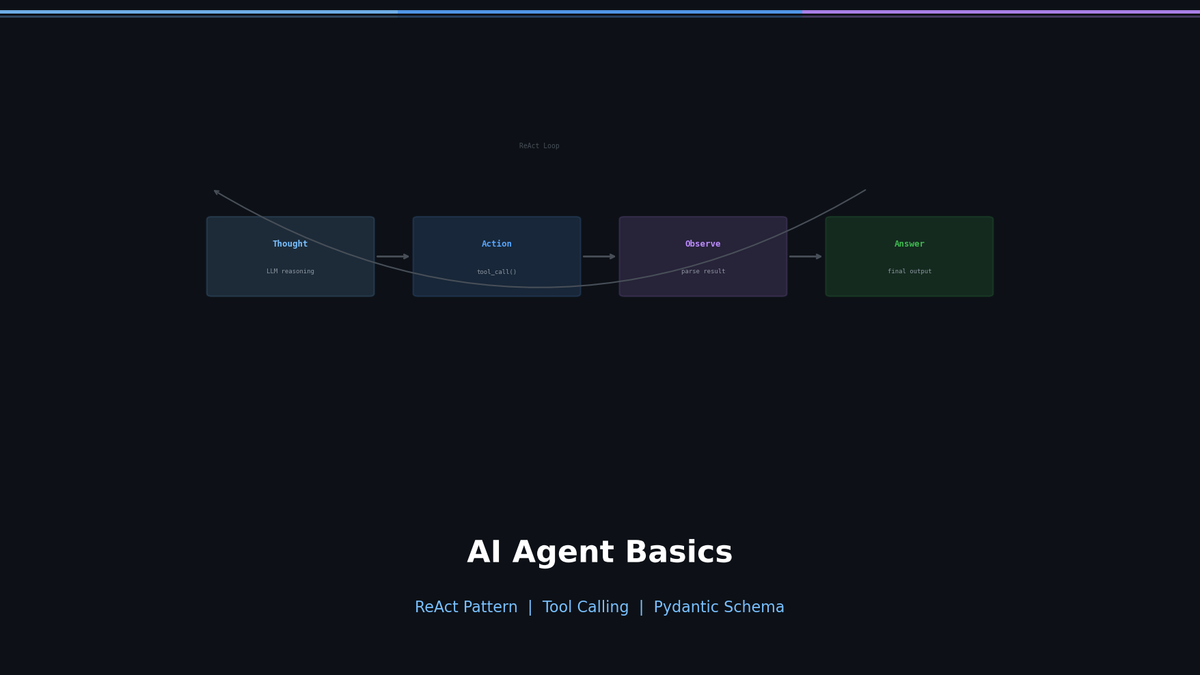
Getting Started with AI Agents — Making LLMs Act with the ReAct Pattern
Ask ChatGPT "What's the weather in Seoul right now?" and you get: "I don't have access to real-time information." But an Agent would call a weather API, interpret the result, and answer in natural language. This difference is what separates chatbots from agents.
In this post, we will understand the ReAct pattern — the most fundamental building block of agents — implement it from scratch in pure Python, and then explore why it evolved into Tool Calling.
Series: Part 1 (this post) | Part 2: LangGraph + Reflection | Part 3: MCP + Multi-Agent | Part 4: Production Deployment
Chatbot vs Agent: What's the Difference?
Most LLM applications are "chatbots." The user asks a question, and the model answers from its trained knowledge. Input to Output — that's it.
Agents are different. The LLM uses Tools to interact with the outside world. It searches, calculates, calls APIs, and queries databases. Then, based on those results, it decides the next action on its own.
| Aspect | Chatbot | Agent |
|---|---|---|
| How it works | Input → LLM → Output | Input → LLM → Tool → Observation → ... → Output |
| Knowledge scope | Limited to training data | Can access real-time information |
| External integration | Not possible | APIs, databases, file systems, etc. |
| Decision-making | Single response | Multi-step reasoning and action |
| Error handling | None | Can retry, choose alternative tools |
Key Insight: Agent = LLM + Tools + Loop. The LLM decides "what to do," the Tool performs the "actual action," and the Loop repeats "until completion."
ReAct: Reasoning + Acting
The ReAct (Reasoning and Acting) paper by Yao et al. in 2022 laid the foundation for LLM agents. The core idea is simple: make the LLM alternate between Thinking (Thought) and Acting (Action) in a repeated cycle.
Thought → Action → Observation Loop
A ReAct agent repeats three steps:
- Thought — Reasons about "What should I do in this situation?"
- Action — Selects and executes the appropriate tool
- Observation — Receives the tool's result and uses it for the next decision
User: "Tell me Tesla's current stock price and market cap"

Thought: I need to search for Tesla's current stock price.
Action: search["Tesla current stock price"]
Observation: Tesla (TSLA) is currently trading at $248.50...

Thought: I found the stock price. Now I need to find the market cap.
Action: search["Tesla market cap 2024"]
Observation: Tesla's market capitalization is $792 billion...

Thought: I have both pieces of information, so I can provide the answer.
Final Answer: Tesla's current stock price is $248.50, and its market cap is approximately $792 billion.
The reason this pattern is powerful is that the reasoning process is transparent. You can see exactly why the model took each action and what the intermediate results were.
Building a ReAct Agent from Scratch
Enough theory. Let's implement a ReAct Agent using pure Python and the OpenAI API.
Step 1: Define the Tools
First, we create the tools the Agent will use.
import math
import requests

def search(query: str) -> str:
    """Simulates a web search."""
    # In practice, use Tavily, SerpAPI, etc.
    responses = {
        "Seoul weather": "Seoul current temperature 22°C, clear skies, humidity 45%",
        "Python latest version": "Python 3.13.0 (released October 2024)",
    }
    return responses.get(query, f"No search results found for '{query}'.")

def calculate(expression: str) -> str:
    """Evaluates a mathematical expression."""
    try:
        result = eval(expression, {"__builtins__": {}}, {"math": math})
        return str(result)
    except Exception as e:
        return f"Calculation error: {e}"

# Tool registry
TOOLS = {
    "search": search,
    "calculate": calculate,
}
Step 2: System Prompt
The system prompt is the heart of the ReAct pattern. We need to clearly tell the LLM "in what format to think and act."
SYSTEM_PROMPT = """You are a helpful assistant that can use tools to answer questions.

Available tools:
- search[query]: Search the web for information
- calculate[expression]: Evaluate a mathematical expression

You MUST follow this exact format for each step:

Thought: <your reasoning about what to do next>
Action: <tool_name>[<argument>]

After receiving an Observation, continue with another Thought/Action,
or provide your final response:

Thought: <I now have enough information>
Final Answer: <your complete answer to the user>

Always think step by step. Use tools when you need external information."""
Step 3: The Agent Loop Structure
The remaining implementation involves two things: parsing Actions from the LLM's text response, and wiring it all into a loop. In pseudocode:
def react_agent(question):
    messages = [system_prompt, user_question]

    repeat (max 5 times):
        response = LLM(messages)

        if "Final Answer" in response:
            return final answer

        if "Action: tool[arg]" in response:
            result = execute_tool(tool, arg)
            add Observation to messages

    return "max iterations exceeded"
The key detail is that Actions are extracted from the LLM's text output using regex. This approach works, but it causes serious problems in production (more on this below).
When we ask this Agent "What's the weather in Seoul? Convert it to Fahrenheit," here's what happens:
--- Step 1 ---
Thought: I need to search for the current weather in Seoul.
Action: search[Seoul weather]
Observation: Seoul current temperature 22°C, clear skies, humidity 45%

--- Step 2 ---
Thought: The temperature in Seoul is 22°C. I'll convert it to Fahrenheit. Formula: F = C * 9/5 + 32
Action: calculate[22 * 9/5 + 32]
Observation: 71.6

--- Step 3 ---
Thought: I have all the information I need.
Final Answer: The current weather in Seoul is clear skies, with a temperature of 22°C (71.6°F) and humidity of 45%.
Thought → Action → Observation flows naturally into a final answer.
Limitations of ReAct — Why This Won't Work in Production
The Agent above works well in demos. But trying to ship it to production reveals critical problems.
| Problem | ReAct (Text Parsing) | Solution |
|---|---|---|
| Format guarantee | LLM may break the format | ? |
| Type safety | All arguments are strings | ? |
| Multiple arguments | Parsing rules become complex | ? |
| Error handling | Must be implemented manually | ? |
| Parallel calls | Not possible | ? |
For example, if the LLM outputs Action: search[ Seoul weather ] (extra spaces) or action: search[Seoul weather] (lowercase), the regex parsing breaks. Nested brackets like Action: calculate[len([1,2,3])] are completely unparseable.
The solution to all of these problems is Tool Calling — a structured approach combining OpenAI's Function Calling API with Pydantic. We cover this evolution in Part 2.
When Should You Use an Agent?
Agents are powerful, but they are not a silver bullet. Introducing an Agent where it is unnecessary only adds complexity.
When You Need an Agent
- When you need real-time information: Querying live data such as weather, stock prices, or news
- When multi-step reasoning is required: "Look up A, calculate B from the result, and compare it with C"
- When integrating with external systems: Database queries, API calls, file read/write
- When user intent varies widely: When a single interface needs to serve multiple capabilities
When You Don't Need an Agent
- Simple Q&A: Questions that can be answered sufficiently from training data
- Fixed pipelines: Workflows where input → processing → output is always the same
- When latency matters: Tool calls introduce additional latency
- When cost is a concern: Each loop iteration incurs API call costs
Decision flow when a question comes in:

Does it need external information? ─── No ──→ Standard LLM call
        │
       Yes
        ↓
Is a single API call enough? ─── Yes ──→ Simple function call
        │
       No
        ↓
Does it require multi-step reasoning? ─── No ──→ RAG pipeline
        │
       Yes
        ↓
    Introduce an Agent
Next Up: Tool Calling + LangGraph + Reflection
Part 1 covered the foundations — the ReAct pattern's concept and structure. Starting from Part 2, we get into real implementation:
- Tool Calling implementation — replace ReAct's regex parsing with Pydantic + Function Calling
- LangGraph — structure agent workflows as graphs
- Self-Critique (Reflection) — agents that validate and improve their own output
- Planning Agent — decompose complex tasks into steps and execute them
Part 3 covers MCP + Multi-Agent, and Part 4 covers Guardrails + Docker deployment.
References
Part 1 of 4 complete
3 more parts waiting for you
From theory to production deployment — subscribe to unlock the full series and all premium content.
Subscribe to Newsletter
Related Posts
TurboQuant in vLLM on One A100 — Capacity, Speed, and Accuracy of All Four Presets on an 8B Model
vLLM 0.28, Qwen3-8B bf16, one A100 80GB: KV capacity, batched throughput, 32K decode, needle-in-haystack, and GSM8K for bf16, fp8, and all four TurboQuant presets — the 8B size vLLM's own study skipped.
TurboQuant From Scratch on Real KV Tensors — What 3 Bits Actually Cost, and Why the Forks Beat the Paper's Layout
PolarQuant in 60 lines of PyTorch on real KV from Llama-3.2-1B and Qwen3-8B: 3-bit costs +10% perplexity, k8v4 +0.2%, QJL only pays below 4 bits, and the block-32 layout explains half the forks' edge.
TurboQuant llama.cpp CUDA Fork, Measured on an A100 — turbo4 Matches q4_0, turbo3 Breaks at Long Context
Qwen3-8B Q4_K_M on one A100, six KV types: perplexity, prefill, decode-at-depth, and VRAM measured. turbo4 matches q4_0 quality and beats q8_0 decode 2.5x at depth; turbo3 triples perplexity at 32K context.