From Evaluation to Deployment — The Complete Fine-tuning Guide

From Evaluation to Deployment — The Complete Fine-tuning Guide
In Part 1 we covered LoRA fundamentals and ran our first fine-tuning. In Part 2 we tackled QLoRA and Korean dataset construction. Training is done. Now two questions remain:
Series: Part 1: LoRA Theory | Part 2: QLoRA + Korean | Part 3 (this post)
- Did the model actually improve? (Evaluation)
- How do we serve it to users? (Deployment)
Part 3 walks through evaluation methodology, deployment options, and practical tips that tie the entire series together.
1. Evaluation Methodology
Evaluating a fine-tuned model breaks down into four axes.
Measuring Perplexity
Perplexity (PPL) is the most fundamental metric for language models. It measures "how well the model predicts the next token." Lower is better.
import torch
from torch.nn import CrossEntropyLoss
from transformers import AutoModelForCausalLM, AutoTokenizer
from datasets import load_dataset
def calculate_perplexity(model, tokenizer, dataset, max_length=1024):
model.eval()
total_loss = 0
total_tokens = 0
with torch.no_grad():
for example in dataset:
inputs = tokenizer(
example["text"],
return_tensors="pt",
truncation=True,
max_length=max_length,
).to(model.device)
outputs = model(**inputs, labels=inputs["input_ids"])
total_loss += outputs.loss.item() * inputs["input_ids"].size(1)
total_tokens += inputs["input_ids"].size(1)
avg_loss = total_loss / total_tokens
perplexity = torch.exp(torch.tensor(avg_loss)).item()
return perplexity
# Usage example
eval_dataset = load_dataset("json", data_files="eval_data.jsonl", split="train")
ppl = calculate_perplexity(model, tokenizer, eval_dataset)
print(f"Perplexity: {ppl:.2f}")An important caveat: PPL is only meaningful when compared on the same evaluation data. Measuring on training data will give an overfitted model artificially better numbers.
KoBEST Benchmark (Korean Language Understanding)
KoBEST is the de facto standard for evaluating Korean language models. It consists of five tasks designed to test Korean-specific understanding.
from lm_eval import simple_evaluate
from lm_eval.models.huggingface import HFLM
lm = HFLM(pretrained=model, tokenizer=tokenizer, batch_size=8)
results = simple_evaluate(
model=lm,
tasks=["kobest_boolq", "kobest_copa", "kobest_wic",
"kobest_hellaswag", "kobest_sentineg"],
num_fewshot=5,
)
for task, metrics in results["results"].items():
print(f"{task}: {metrics['acc,none']:.4f}")Task-specific Evaluation
For domain-fine-tuned models, task-specific metrics matter more than general benchmarks.
from rouge_score import rouge_scorer
scorer = rouge_scorer.RougeScorer(["rouge1", "rouge2", "rougeL"], use_stemmer=False)
def evaluate_summarization(model, tokenizer, eval_pairs):
"""eval_pairs: list of (input_text, reference_summary)"""
scores = {"rouge1": [], "rouge2": [], "rougeL": []}
for input_text, reference in eval_pairs:
messages = [{"role": "user", "content": f"Summarize the following:\n{input_text}"}]
inputs = tokenizer.apply_chat_template(messages, return_tensors="pt").to("cuda")
outputs = model.generate(inputs, max_new_tokens=256)
prediction = tokenizer.decode(outputs[0], skip_special_tokens=True)
result = scorer.score(reference, prediction)
for key in scores:
scores[key].append(result[key].fmeasure)
return {k: sum(v) / len(v) for k, v in scores.items()}Human Evaluation Guidelines
Automated metrics only go so far. In particular, Korean naturalness, honorific consistency, and factual accuracy require human judgment. Recommendations for evaluation design:
- Number of evaluators: At least 3 (for inter-rater agreement)
- Rating scale: 1-5 Likert scale, scored per dimension (fluency / accuracy / relevance)
- Blind comparison: Present Base vs Fine-tuned outputs in randomized order
- Sample size: At least 50 examples (for statistical significance)
Before / After Comparison
Below are results from QLoRA training on Qwen 2.5 7B with 3,000 Korean customer service examples. Note that these examples demonstrate Korean language improvement specifically.
Example 1: Refund request
Example 2: Technical support
Example 3: Product inquiry
Note: The original Korean examples show a dramatic shift in quality. The base model produced either stiff, template-like Korean or defaulted to English entirely (Example 2). The fine-tuned model responded in natural, polite Korean with specific and actionable details.
Benchmark comparison:
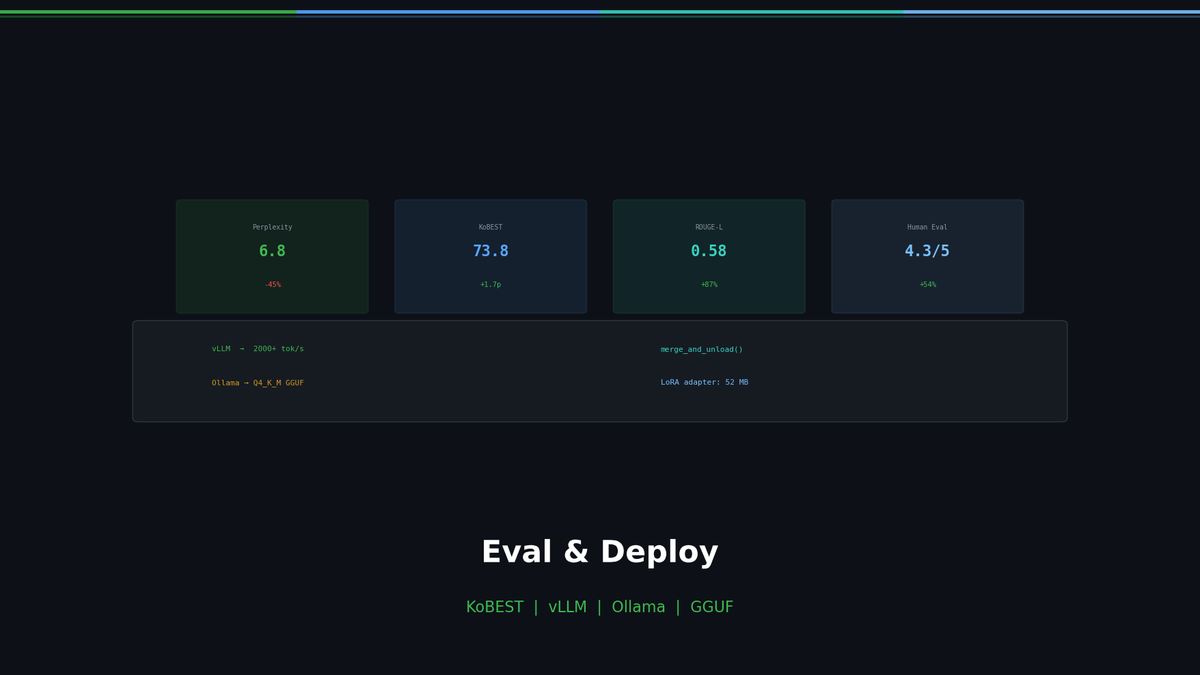
KoBEST (general Korean understanding) barely changed, but domain tasks improved dramatically. This is the essence of fine-tuning.
2. Merging LoRA Weights
Once training is complete, you can merge the LoRA adapter into the base model.
merge_and_unload()
from peft import PeftModel
from transformers import AutoModelForCausalLM, AutoTokenizer
# 1. Load base model
base_model = AutoModelForCausalLM.from_pretrained(
"Qwen/Qwen2.5-7B-Instruct",
torch_dtype=torch.bfloat16,
device_map="cpu", # Merging on CPU is fine
)
# 2. Load LoRA adapter
model = PeftModel.from_pretrained(base_model, "./qwen25-qlora-ko-adapter")
# 3. Merge
model = model.merge_and_unload()
# 4. Save
model.save_pretrained("./qwen25-ko-merged")
tokenizer = AutoTokenizer.from_pretrained("Qwen/Qwen2.5-7B-Instruct")
tokenizer.save_pretrained("./qwen25-ko-merged")merge_and_unload() computes $W' = W_0 + BA$ and folds everything into a single set of weights. The result is structurally identical to a standard HuggingFace model.
Merged vs Adapter-separate
Recommendation: Merge for final deployment. Keep adapters separate during experimentation and A/B testing.
GGUF Conversion after Merging
Converting to GGUF — the llama.cpp-compatible format — lets you run the model directly in Ollama, LM Studio, and similar tools.
# Clone llama.cpp
git clone https://github.com/ggerganov/llama.cpp
cd llama.cpp
pip install -r requirements.txt
# HuggingFace → GGUF conversion (Q4_K_M quantization)
python convert_hf_to_gguf.py ../qwen25-ko-merged \
--outtype q4_k_m \
--outfile qwen25-ko-Q4_K_M.ggufQuantization options — size vs quality tradeoff:
In most cases Q4_K_M offers the best balance between size and quality.
3. Deployment Options
The model is ready — time to serve it. Here are four approaches compared by use case.
Serving with vLLM
The most common approach for production environments. vLLM can load LoRA adapters directly without merging.
from vllm import LLM, SamplingParams
from vllm.lora.request import LoRARequest
# Load LoRA adapter directly
llm = LLM(
model="Qwen/Qwen2.5-7B-Instruct",
enable_lora=True,
max_lora_rank=64,
)
sampling_params = SamplingParams(temperature=0.7, max_tokens=512)
# Run inference with the adapter
lora_request = LoRARequest("ko-cs", 1, "./qwen25-qlora-ko-adapter")
outputs = llm.generate(
["Dear customer, here is the information regarding your refund request."],
sampling_params,
lora_request=lora_request,
)
print(outputs[0].outputs[0].text)The key advantage of vLLM is serving multiple LoRA adapters simultaneously. You can switch between customer service, technical documentation, and marketing adapters on a single server.
# Run as an OpenAI-compatible API server
vllm serve Qwen/Qwen2.5-7B-Instruct \
--enable-lora \
--lora-modules ko-cs=./qwen25-qlora-ko-adapter \
--port 8000Local Deployment with Ollama
The simplest option for personal use or internal team deployment. Requires a GGUF file.
# Modelfile
FROM ./qwen25-ko-Q4_K_M.gguf
TEMPLATE """{{ if .System }}<|im_start|>system
{{ .System }}<|im_end|>
{{ end }}<|im_start|>user
{{ .Prompt }}<|im_end|>
<|im_start|>assistant
"""
PARAMETER temperature 0.7
PARAMETER top_p 0.9
PARAMETER stop "<|im_end|>"
SYSTEM "You are a Korean customer service AI assistant. Always respond politely and with specific details."# Create and run the model
ollama create qwen25-ko -f Modelfile
ollama run qwen25-ko "I'd like to check my delivery status"HuggingFace Spaces (Gradio Demo)
Great for sharing prototypes or demoing to non-technical teams.
import gradio as gr
from transformers import AutoModelForCausalLM, AutoTokenizer, pipeline
model = AutoModelForCausalLM.from_pretrained(
"./qwen25-ko-merged", torch_dtype="auto", device_map="auto"
)
tokenizer = AutoTokenizer.from_pretrained("./qwen25-ko-merged")
pipe = pipeline("text-generation", model=model, tokenizer=tokenizer)
def chat(message, history):
messages = [{"role": "user", "content": message}]
for user_msg, bot_msg in history:
messages.insert(-1, {"role": "user", "content": user_msg})
messages.insert(-1, {"role": "assistant", "content": bot_msg})
prompt = tokenizer.apply_chat_template(messages, tokenize=False)
output = pipe(prompt, max_new_tokens=512, temperature=0.7)
return output[0]["generated_text"].split("<|im_start|>assistant\n")[-1]
demo = gr.ChatInterface(chat, title="Korean Customer Service AI")
demo.launch()Deployment Options at a Glance
4. Practical Tips
To close out the series, here are recurring real-world issues and how to solve them.
Overfitting: Signs and Fixes
Overfitting happens with LoRA too. Be especially careful when data is scarce (under 1,000 examples).
Signs:
- Train loss keeps dropping while eval loss climbs
- Perfect on inputs similar to training data, but nonsensical on anything slightly different
- The model memorizes and regurgitates training sentences verbatim
Fixes:
- Increase
lora_dropoutto 0.1-0.15 - Reduce
r(rank): 64 → 16 - Reduce training epochs: 3 → 1
- Increase data diversity (most effective)
- Apply early stopping
from transformers import EarlyStoppingCallback
trainer = SFTTrainer(
model=model,
args=training_args,
train_dataset=train_dataset,
eval_dataset=eval_dataset,
callbacks=[EarlyStoppingCallback(early_stopping_patience=3)],
)Data Quality > Data Quantity
1,000 high-quality examples beat 10,000 noisy ones. Actual experimental results:
Data quality checklist:
- Are there any grammatical errors?
- Does the instruction precisely match the response?
- Are there duplicates? (More than 5% duplication degrades performance)
- Is response length consistent? (Mixing very short and very long answers causes instability)
Hyperparameter Guide
Recommended starting point: Begin with lr=2e-4, epochs=1, r=16, alpha=32, batch=16, warmup=0.1, then adjust based on eval loss.
Multi-task LoRA: Adapter Switching
You can create multiple LoRA adapters for a single base model and switch between them per task.
from peft import PeftModel
base_model = AutoModelForCausalLM.from_pretrained(
"Qwen/Qwen2.5-7B-Instruct", torch_dtype=torch.bfloat16, device_map="auto"
)
# Adapter 1: Customer service
model = PeftModel.from_pretrained(base_model, "./adapter-customer-service")
# Run customer service inference ...
# Adapter 2: Switch to technical documentation
model.load_adapter("./adapter-tech-docs", adapter_name="tech")
model.set_adapter("tech")
# Run technical documentation inference ...
# Adapter 3: Switch to marketing copy
model.load_adapter("./adapter-marketing", adapter_name="marketing")
model.set_adapter("marketing")
# Run marketing copy inference ...Base model 14 GB + adapter 52 MB x 3 = 14.15 GB total. Three specialized models running on a single GPU.
When NOT to Use LoRA
LoRA is not a silver bullet. In the following situations, consider alternatives.
5. Series Summary
The message running through all three parts: LoRA is the art of cost-efficiency. It cuts 99% of full fine-tuning costs while retaining 90-98% of the performance. You can fine-tune a 7B model on a free Colab GPU, and a single 52 MB adapter turns a general-purpose model into a domain expert.
Recommended path for those just getting started:
- First check whether prompt engineering alone is sufficient
- If not, build 1,000 high-quality training examples
- Fine-tune with QLoRA (see Part 2)
- Evaluate → augment data → retrain (iterate)
- Once satisfied, merge and deploy