Mastering LoRA — Fine-tune a 7B Model on a Single Notebook
From LoRA theory to Qwen 2.5 7B model setup. 99.8% parameter reduction and 86% memory savings vs full fine-tuning, explained with code.
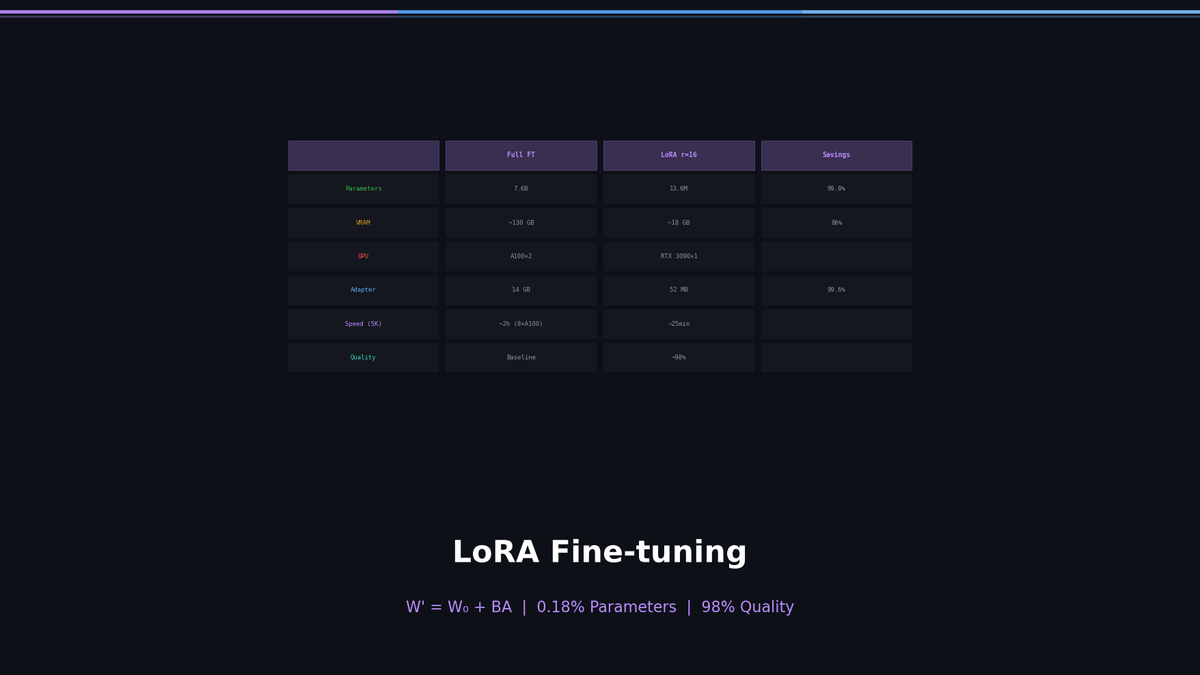
Mastering LoRA — Fine-tune a 7B Model on a Single Notebook
What if you could fine-tune a 7-billion-parameter model on a single GPU?
Just two years ago, LLM fine-tuning required 8x A100 GPUs and hundreds of gigabytes of memory — a luxury reserved for big tech companies. LoRA (Low-Rank Adaptation) changed the game entirely. For a 7B model, it reduces trainable parameters to 0.1% while achieving performance on par with full fine-tuning.
In this series, we walk through the entire pipeline — LoRA, QLoRA, evaluation, and deployment — using Qwen 2.5 7B as our target model.
- Part 1 (this post): LoRA theory + first fine-tune
- Part 2: QLoRA + Korean dataset construction
- Part 3: Evaluation + deployment + practical tips
Why Fine-tune at All?
General-purpose LLMs like GPT-4, Claude, and Qwen are decent at everything. But "decent" is not enough for specialized domains.
| Scenario | General LLM | Fine-tuned Model |
|---|---|---|
| Legal document summarization | Generic summary, imprecise legal terms | Accurate summaries following case law format |
| Korean customer support | Awkward phrasing, unnatural honorifics | Natural, fluent Korean polite speech |
| Medical chart analysis | General knowledge level | Specialized medical terminology + diagnostic patterns |
| Code review | Generic feedback | Specific feedback aligned with team conventions |
Prompt engineering can cover some ground, but it has clear limits:
- Token cost: You need to send a lengthy system prompt with every request
- Consistency: The longer the prompt, the higher the chance the model misses instructions
- Knowledge ceiling: Prompting alone cannot inject knowledge the model simply does not have
Fine-tuning modifies the model's weights directly, addressing all three issues at the root.
The Problem with Full Fine-tuning: Memory
How much does it take to fully fine-tune a 7B model?
Model parameters: 7B × 4 bytes (FP32) = 28 GB
Optimizer states (Adam): 7B × 8 bytes = 56 GB
Gradients: 7B × 4 bytes = 28 GB
Activations: ~20-40 GB (varies with batch size)
──────────────────────────────
Total VRAM required: ~130-150 GB
That demands two A100 80GB cards. Cloud cost: $6-8 per hour.
The key question here: do we really need to update all 7B parameters?
LoRA: The Core Idea
LoRA's central insight is surprisingly simple:
The weight update produced by fine-tuning has low rank.
Mathematically:
Where:
- : pre-trained original weights (frozen, not trained)
- : small matrix
- : small matrix
- : rank (typically 8–64, much smaller than the original dimension )
For example, in an attention layer where and :
| Parameter Count | Ratio | |
|---|---|---|
| Original $W$ | 4096 × 4096 = 16.7M | 100% |
| LoRA ($r=16$) | 4096 × 16 + 16 × 4096 = 131K | 0.78% |
Instead of training 16.7M parameters, we train only 131K. A 99.2% reduction.
Why Does This Work?
Let's build some intuition. A pre-trained LLM already knows the fundamental structure of language. Fine-tuning is about nudging that existing knowledge, not learning from scratch.
Think of it this way: a fluent English speaker learning medical terminology does not need to relearn the entire language. They just need to pick up new vocabulary and expression patterns. That "delta" is low-rank.
Key LoRA Hyperparameters
| Parameter | Meaning | Recommended Range | Description |
|---|---|---|---|
r (rank) | Decomposition dimension | 8–64 | Higher = more expressive, more memory |
lora_alpha | Scaling factor | 1–2× r | Indirectly controls learning rate |
target_modules | Layers to adapt | q_proj, v_proj | Attention layers are most effective |
lora_dropout | Dropout rate | 0.05–0.1 | Prevents overfitting |
lora_alpha / r is the effective scaling ratio. With alpha=32, r=16, the scale is 2, meaning LoRA's contribution is amplified by 2×.
Hands-on: LoRA Fine-tuning Qwen 2.5 7B
Time to turn theory into code. The full code is available in the accompanying Jupyter notebook.
Environment Setup
!pip install -q transformers peft datasets accelerate bitsandbytes trlimport torch
from transformers import AutoModelForCausalLM, AutoTokenizer, TrainingArguments
from peft import LoraConfig, get_peft_model, TaskType
from datasets import load_dataset
from trl import SFTTrainerLoading the Model
model_name = "Qwen/Qwen2.5-7B-Instruct"

tokenizer = AutoTokenizer.from_pretrained(model_name)
tokenizer.pad_token = tokenizer.eos_token

model = AutoModelForCausalLM.from_pretrained(
    model_name,
    torch_dtype=torch.bfloat16,
    device_map="auto",
)
We load Qwen 2.5 7B Instruct in bfloat16. This alone uses roughly 14 GB of VRAM.
Configuring LoRA
lora_config = LoraConfig(
    task_type=TaskType.CAUSAL_LM,
    r=16,
    lora_alpha=32,
    lora_dropout=0.05,
    target_modules=["q_proj", "k_proj", "v_proj", "o_proj",
                     "gate_proj", "up_proj", "down_proj"],
)

model = get_peft_model(model, lora_config)
model.print_trainable_parameters()
# trainable params: 13,631,488 || all params: 7,628,554,240 || trainable%: 0.1787
Out of 7.6B total parameters, only 13.6 million (0.18%) are trainable.
Note that target_modules includes not just attention layers (q/k/v/o_proj) but also FFN layers (gate/up/down_proj). Recent research shows that including FFN layers yields better performance.
That's the core of LoRA setup. Only 0.18% of 7.6B parameters are trainable — that's all there is to it.
The next steps are:
- Dataset preparation — format data to match Qwen's chat template
- Training — run actual training with
SFTTrainer(~25 min on RTX 3090) - Save the adapter — one 52 MB adapter file, done
- Inference — load base model + adapter → ready to use
In Part 2, we run this entire pipeline with QLoRA (4-bit quantization). It works on a T4 with just 16 GB of VRAM, and we build a Korean dataset from scratch to measurably improve the model's Korean performance.
Memory Comparison: Full FT vs LoRA
Measured on the same Qwen 2.5 7B with the same dataset.
| Full Fine-tuning | LoRA (r=16) | Reduction | |
|---|---|---|---|
| Trainable parameters | 7.6B | 13.6M | 99.8% |
| VRAM usage | ~130 GB | ~18 GB | 86% |
| Required GPU | A100 80GB × 2 | RTX 3090 × 1 | |
| Adapter size | 14 GB (full model) | 52 MB | 99.6% |
| Training time (5K samples) | ~2 hrs (8×A100) | ~25 min (1×A100) | |
| Inference quality | Baseline | ~98% of Full FT |
LoRA wins by a wide margin in efficiency. Pay special attention to the "~98% inference quality" row. There is no reason to spend 10× the cost for a 2% performance gap.
Frequently Asked Questions
Q: Is a higher rank always better?
No. The difference between rank=8 and rank=64 is marginal for most tasks. In fact, excessively high rank increases the risk of overfitting. As a rule of thumb:
- Simple tasks (tone adjustment, format compliance): r=8
- Medium tasks (domain adaptation): r=16–32
- Complex tasks (injecting new knowledge): r=32–64
Q: Which layers should I apply LoRA to?
Applying LoRA to all attention + FFN layers is the safest bet. The original paper used only q_proj and v_proj, but subsequent studies have shown that targeting more layers consistently improves performance.
Q: Does LoRA degrade the base model's capabilities?
LoRA never touches the original weights. Remove the adapter, and you get the original model back. This is one of LoRA's greatest strengths.
Next Up: QLoRA + Custom Dataset + Full Training Pipeline
Part 1 covered LoRA theory and configuration. Part 2 is where the real work happens:
- QLoRA — 4-bit quantization to fine-tune 7B on a T4 with just 16 GB VRAM
- Building a custom dataset — formatting domain data into chat template format
- Training + Wandb monitoring — interpreting loss curves, detecting overfitting
- Save → Inference → Before/After comparison — verifying actual performance gains
Part 3 covers evaluation (Perplexity, KoBEST benchmark), LoRA weight merging, and deployment with vLLM/Ollama.
References
Part 1 of 4 complete
3 more parts waiting for you
From theory to production deployment — subscribe to unlock the full series and all premium content.
Subscribe to Newsletter
Related Posts
TurboQuant in vLLM on One A100 — Capacity, Speed, and Accuracy of All Four Presets on an 8B Model
vLLM 0.28, Qwen3-8B bf16, one A100 80GB: KV capacity, batched throughput, 32K decode, needle-in-haystack, and GSM8K for bf16, fp8, and all four TurboQuant presets — the 8B size vLLM's own study skipped.
TurboQuant From Scratch on Real KV Tensors — What 3 Bits Actually Cost, and Why the Forks Beat the Paper's Layout
PolarQuant in 60 lines of PyTorch on real KV from Llama-3.2-1B and Qwen3-8B: 3-bit costs +10% perplexity, k8v4 +0.2%, QJL only pays below 4 bits, and the block-32 layout explains half the forks' edge.
TurboQuant llama.cpp CUDA Fork, Measured on an A100 — turbo4 Matches q4_0, turbo3 Breaks at Long Context
Qwen3-8B Q4_K_M on one A100, six KV types: perplexity, prefill, decode-at-depth, and VRAM measured. turbo4 matches q4_0 quality and beats q8_0 decode 2.5x at depth; turbo3 triples perplexity at 32K context.