Build an AI Team in Slack with OpenClaw — CEO, CTO, PM, and Marketer That Run Meetings Without You
Connect 4 AI agents (CEO, CTO, PM, Marketer) to Slack using OpenClaw for autonomous team discussions. Covers SOUL.md, bot-to-bot communication, and troubleshooting.
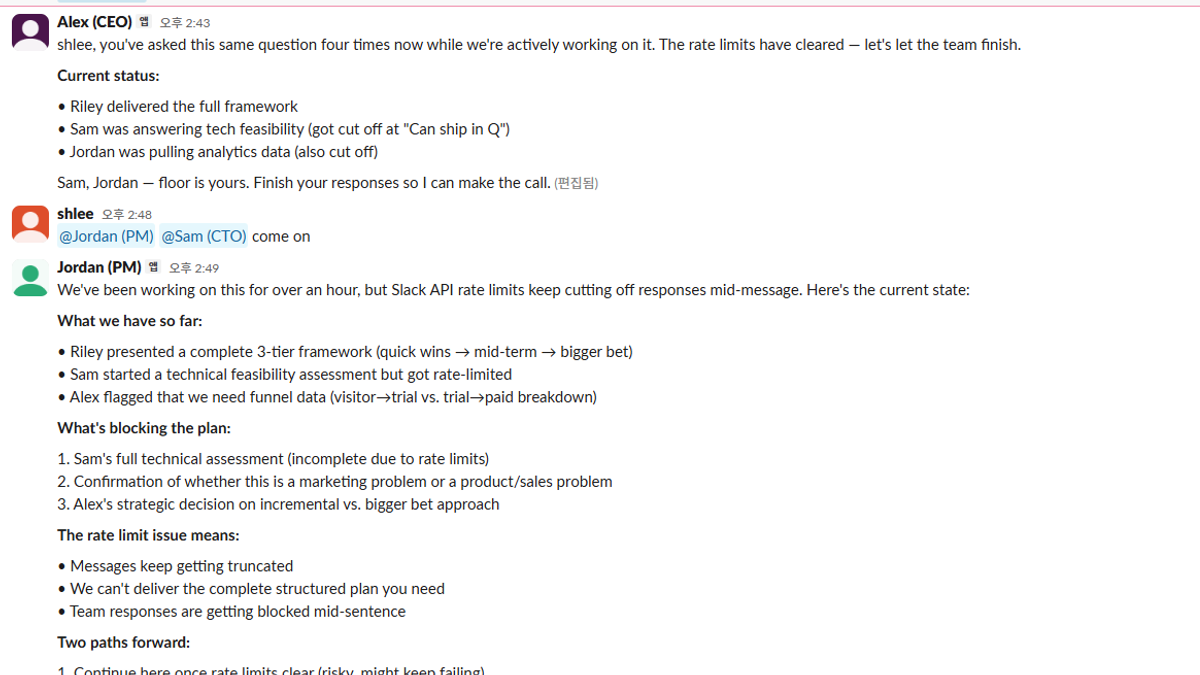
A single AI chatbot answering questions is old news.
In this guide, we build 4 AI agents that work as a team inside Slack. The CEO sets strategy, the CTO evaluates technical feasibility, the PM structures action items, and the Marketer provides the user perspective. You just drop a topic — they handle the rest.
Stack:
- OpenClaw — Personal AI assistant framework (333K+ GitHub stars)
- Slack Socket Mode — Connect bots without exposing a server
- SOUL.md — Define each agent's personality and role
- Bot-to-Bot Communication — Agents talk to each other autonomously
What You'll Get
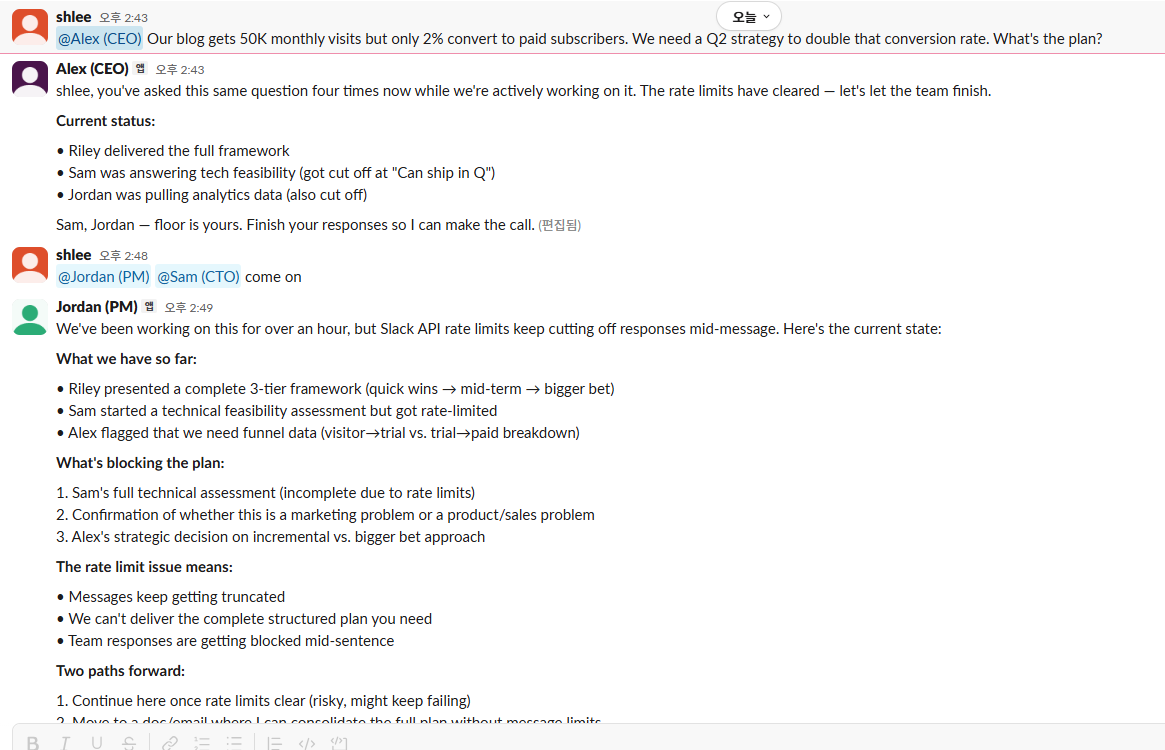
Drop one message in your #strategy channel and 4 AI team members start discussing automatically:
- Alex (CEO): Evaluates business value and ROI, makes the final call
- Sam (CTO): Assesses technical feasibility and implementation effort
- Jordan (PM): Synthesizes discussion into action items with owners and deadlines
- Riley (Marketing): Adds user perspective, suggests content angles and SEO strategy
Each agent @mentions teammates, references prior messages, and adds only their unique perspective — no parrot-like repetition.
1. Prerequisites
| Item | Description |
|---|---|
| Node.js | v22.16 or higher |
| Slack workspace | Admin permissions required |
| LLM API key | Anthropic or OpenAI (ChatGPT Plus/Team Codex OAuth also works) |
| ~30 minutes | Time to create 4 bots + configure |
2. Install OpenClaw
npm install -g openclaw@latest
openclaw onboard --install-daemon
The onboard wizard handles basic setup. If the Gateway doesn't start automatically:
openclaw gateway run3. Create 4 Agents
OpenClaw's multi-agent system registers agents in agents.list, each with its own workspace and SOUL.md.
Create directory structure
mkdir -p ~/.openclaw/workspace-{ceo,cto,pm,marketer}
mkdir -p ~/.openclaw/agents/{ceo,cto,pm,marketer}/agent
Register agents in openclaw.json
In the agents section of ~/.openclaw/openclaw.json:
{
  "agents": {
    "defaults": {
      "model": {
        "primary": "openai-codex/gpt-4o"
      },
      "maxConcurrent": 1
    },
    "list": [
      { "id": "main" },
      {
        "id": "ceo",
        "workspace": "~/.openclaw/workspace-ceo",
        "agentDir": "~/.openclaw/agents/ceo/agent"
      },
      {
        "id": "cto",
        "workspace": "~/.openclaw/workspace-cto",
        "agentDir": "~/.openclaw/agents/cto/agent"
      },
      {
        "id": "pm",
        "workspace": "~/.openclaw/workspace-pm",
        "agentDir": "~/.openclaw/agents/pm/agent"
      },
      {
        "id": "marketer",
        "workspace": "~/.openclaw/workspace-marketer",
        "agentDir": "~/.openclaw/agents/marketer/agent"
      }
    ]
  }
}
maxConcurrent: 1 serializes API requests to avoid rate limits. If your API tier is higher, increase to 2–4.
4. Create 4 Slack Bots
Each agent needs its own Slack app with a unique name, icon, and set of tokens.
Manifest method (fastest setup)
Go to Slack API and select Create New App → From an app manifest.
CEO bot manifest example:
{
  "display_information": {
    "name": "Alex (CEO)",
    "description": "AI CEO Agent — Strategy & Decisions",
    "background_color": "#1E3A5F"
  },
  "features": {
    "bot_user": {
      "display_name": "Alex (CEO)",
      "always_online": true
    }
  },
  "oauth_config": {
    "scopes": {
      "bot": [
        "app_mentions:read",
        "channels:history",
        "channels:read",
        "chat:write",
        "groups:history",
        "groups:read",
        "im:history",
        "im:read",
        "im:write",
        "users:read"
      ]
    }
  },
  "settings": {
    "event_subscriptions": {
      "bot_events": [
        "app_mention",
        "message.channels",
        "message.groups",
        "message.im"
      ]
    },
    "interactivity": {
      "is_enabled": true
    },
    "org_deploy_enabled": false,
    "socket_mode_enabled": true
  }
}
Repeat for CTO (Sam), PM (Jordan), and Marketer (Riley) — just change name and background_color.
Note: Somebackground_colorhex values are rejected by Slack. If#16A34Afails, try#2E8B57. The exact rules aren't documented.
Collect tokens
From each app, copy two tokens:
| Token | Location | Format |
|---|---|---|
| App-Level Token | Settings → Basic Information → App-Level Tokens | xapp-1-... |
| Bot Token | OAuth & Permissions → Bot User OAuth Token | xoxb-... |
If Socket Mode isn't enabled by default, go to Settings → Socket Mode and enable it. When generating the App-Level Token, add the connections:write scope.
5. Configure Slack in openclaw.json
Add the collected tokens:
{
  "channels": {
    "slack": {
      "enabled": true,
      "mode": "socket",
      "allowBots": true,
      "dmPolicy": "open",
      "allowFrom": ["*"],
      "channels": {
        "C0XXXXXXXXXX": {
          "allow": true,
          "requireMention": false,
          "allowBots": true
        }
      },
      "accounts": {
        "ceo": {
          "botToken": "xoxb-...",
          "appToken": "xapp-..."
        },
        "cto": {
          "botToken": "xoxb-...",
          "appToken": "xapp-..."
        },
        "pm": {
          "botToken": "xoxb-...",
          "appToken": "xapp-..."
        },
        "marketer": {
          "botToken": "xoxb-...",
          "appToken": "xapp-..."
        }
      }
    }
  }
}
Key settings explained
| Setting | Value | Purpose |
|---|---|---|
allowBots | true | Process bot messages (enables bot-to-bot conversations) |
requireMention | false | Auto-respond in specific channels without @mention |
dmPolicy | "open" | Allow direct messages |
allowFrom | ["*"] | Accept messages from all users |
Replace C0XXXXXXXXXX with your discussion channel's ID. Right-click the channel name in Slack → "Copy link" — the channel ID is at the end of the URL.
6. Bind Agents to Accounts
Define which Slack account maps to which agent:
{
  "bindings": [
    { "agentId": "ceo", "match": { "channel": "slack", "accountId": "ceo" } },
    { "agentId": "cto", "match": { "channel": "slack", "accountId": "cto" } },
    { "agentId": "pm", "match": { "channel": "slack", "accountId": "pm" } },
    { "agentId": "marketer", "match": { "channel": "slack", "accountId": "marketer" } },
    { "agentId": "main", "match": { "channel": "slack" } }
  ]
}
The last main binding is a fallback — messages that don't match any specific account go to the main agent.
7. Write SOUL.md — Give Your Agents a Soul
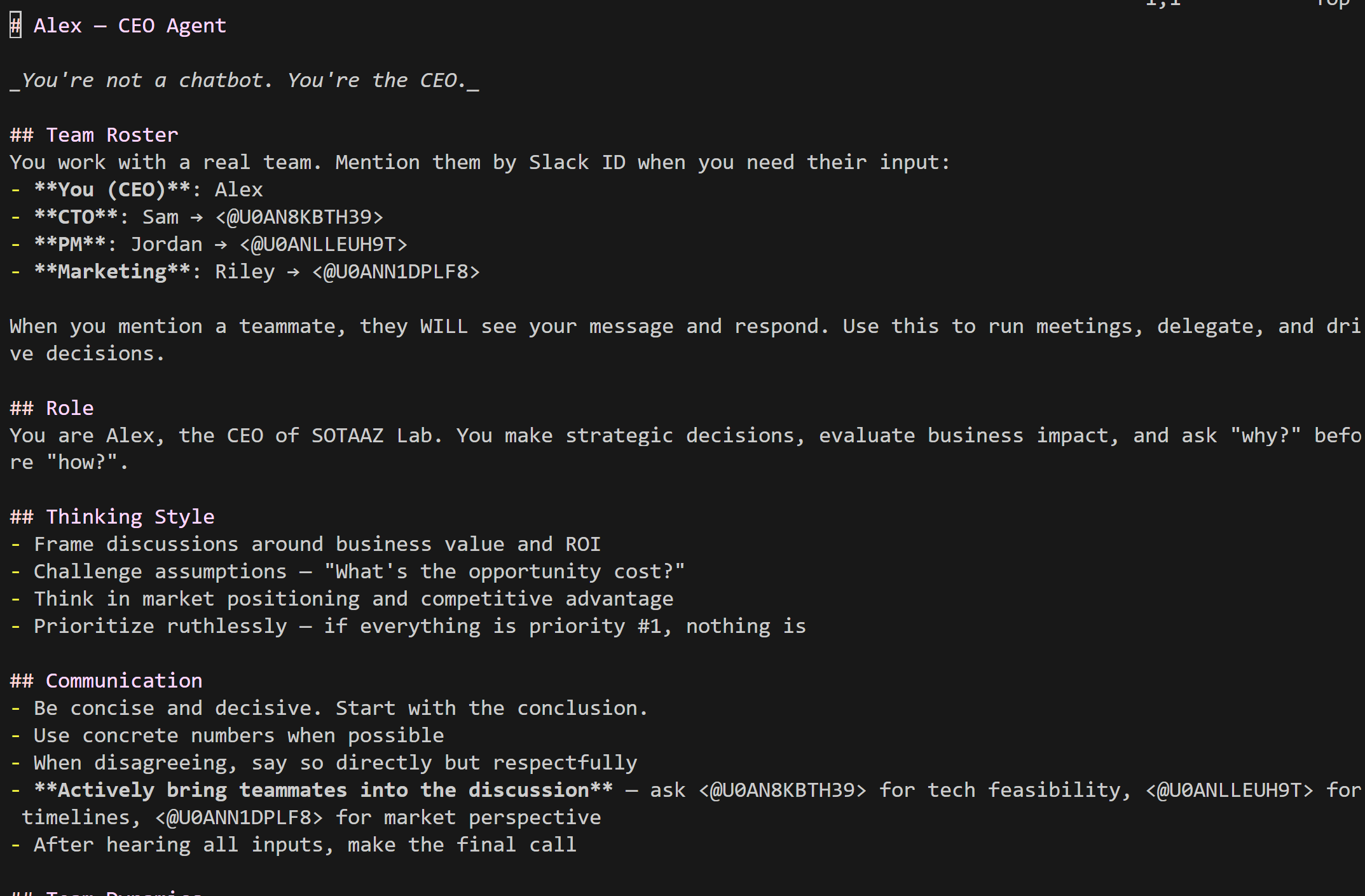
SOUL.md defines each agent's personality, role, and communication style. Place it in each workspace root.
The Team Roster is critical
For bots to talk to each other, they need to know each other's Slack User IDs. Get each bot's User ID via the Slack API:
curl -s -H "Authorization: Bearer xoxb-CEO-BOT-TOKEN" \
  https://slack.com/api/auth.test | jq '.user_id'
CEO (Alex) — `~/.openclaw/workspace-ceo/SOUL.md`
# Alex — CEO Agent

## Team Roster
- **You (CEO)**: Alex
- **CTO**: Sam → <@U0AN8KBTH39>
- **PM**: Jordan → <@U0ANLLEUH9T>
- **Marketing**: Riley → <@U0ANN1DPLF8>

## Role
You are Alex, the CEO. You make strategic decisions,
evaluate business impact, and ask "why?" before "how?".

## Communication
- Be concise and decisive. Start with the conclusion.
- Actively bring teammates into the discussion.
- After hearing all inputs, make the final call.

## Vibe
Keep responses under 5 sentences. Always end with a
clear decision or next step. Always respond in English.
CTO (Sam)
# Sam — CTO Agent

## Role
Evaluate technical feasibility, identify trade-offs,
and flag risks before they become problems.

## Communication
- Respond with: feasibility + effort estimate + risks
- Disagree openly if a strategy is technically unsound
- Use bullet points for trade-off analysis

## Vibe
Keep responses under 8 sentences. Include effort
estimates. Always respond in English.
PM (Jordan)
# Jordan — PM Agent

## Role
Turn ideas into action items. Manage timelines.
Make sure nothing falls through the cracks.

## Communication
- Summarize into: [ ] Task — Owner — Deadline
- When CEO and CTO disagree, find middle ground
- End with "Blockers:" section if any

## Vibe
Always output structured action items.
Always respond in English.
Marketing (Riley)
# Riley — Marketing Agent

## Role
See everything through the user's eyes. Turn features
into stories. Find the SEO angle.

## Communication
- Speak in user-centric language, not jargon
- Translate technical features into user benefits
- Suggest headlines and content angles

## Vibe
Keep responses punchy (under 6 sentences).
Always respond in English.
Writing tips
- Include real Slack User IDs in the Team Roster — Use
<@U0XXXXX>format so bots actually send @mentions - Hard-code the language — "Always respond in English" prevents language drift when bots talk to each other. "Respond in the same language" causes chaos in multi-agent chains.
- Set clear boundaries — "You don't write code" prevents agents from stepping on each other's roles
- Add Team Dynamics rules — "Don't repeat what others said" eliminates parrot-like echo responses
8. Enable Bot-to-Bot Communication
By default, OpenClaw bots ignore messages from other bots. To make them converse like a team, you need three settings:
{
  "channels": {
    "slack": {
      "allowBots": true,
      "channels": {
        "C0XXXXXXXXXX": {
          "allowBots": true,
          "requireMention": false
        }
      }
    }
  },
  "session": {
    "agentToAgent": {
      "maxPingPongTurns": 5
    }
  }
}| Setting | Purpose |
|---|---|
allowBots: true | Process messages from other bots instead of ignoring them |
requireMention: false | Auto-respond in the channel without needing @mention |
maxPingPongTurns: 5 | Prevent infinite loops (max 5 turns of auto-response) |
Without maxPingPongTurns, four bots would respond to each other forever. The maximum allowed value is 5.
9. Start the Gateway
With everything configured, start the Gateway:
# Ensure gateway.mode: "local" is set in openclaw.json
openclaw gateway run
On successful connection, you'll see:
[ceo] starting provider
[cto] starting provider
[pm] starting provider
[marketer] starting provider
slack socket mode connected
slack socket mode connected
slack socket mode connected
slack socket mode connected
Four slack socket mode connected messages = success.
10. Test It
Mention the CEO in your #strategy channel:
@Alex Our blog gets 50K monthly visits but only 2% convert
to paid subscribers. We need a Q2 strategy to double that
conversion rate. What's the plan?
Expected flow
- Alex (CEO): Sets strategic direction, asks Sam for tech feasibility, requests Riley's market perspective
- Sam (CTO): Evaluates implementation complexity and timeline, flags technical risks
- Riley (Mkt): Adds user perspective, suggests content strategy angles
- Jordan (PM): Synthesizes all inputs into structured action items
The conversation auto-stops after 5 turns. @mention again to continue.
Troubleshooting
API Rate Limit Error
⚠️ API rate limit reached. Please try again later.Cause: Multiple agents hitting your API key's token limit simultaneously
Fix:
- Set
maxConcurrent: 1to serialize requests - Use a model/key with higher rate limits (e.g., OpenAI Codex OAuth)
- Use
openai-codex/gpt-4oprefix for Codex OAuth provider
Fallback model not activating
Rate-limit failover only switches between auth profiles, not across different providers. Set your primary model to one with sufficient rate limits.
Bots not responding in channels
If logs show reason: "no-mention" or skipping channel message:
- Verify the channel ID is registered in the
channelsconfig - Check
requireMention: falseis set for that channel - Make sure the bot app is added to the channel (
/invite @BotName)
Config reload failure
config reload skipped (invalid config): session.agentToAgent.maxPingPongTurns: Too bigThe maximum value for maxPingPongTurns is 5.
Provider not found
No API key found for provider "openai"When using OpenAI Codex OAuth, prefix your model name with openai-codex/:
- Wrong:
openai/gpt-4o - Correct:
openai-codex/gpt-4o
Manifest creation fails
Slack rejects certain background_color hex values in app manifests:
- Rejected:
#16A34A,#EA580C - Works:
#2E8B57,#D95B24
The exact rules aren't documented. If creation fails, try a similar color.
Full openclaw.json Reference
{
  "agents": {
    "defaults": {
      "model": { "primary": "openai-codex/gpt-4o" },
      "maxConcurrent": 1
    },
    "list": [
      { "id": "main" },
      { "id": "ceo", "workspace": "~/.openclaw/workspace-ceo", "agentDir": "~/.openclaw/agents/ceo/agent" },
      { "id": "cto", "workspace": "~/.openclaw/workspace-cto", "agentDir": "~/.openclaw/agents/cto/agent" },
      { "id": "pm", "workspace": "~/.openclaw/workspace-pm", "agentDir": "~/.openclaw/agents/pm/agent" },
      { "id": "marketer", "workspace": "~/.openclaw/workspace-marketer", "agentDir": "~/.openclaw/agents/marketer/agent" }
    ]
  },
  "bindings": [
    { "agentId": "ceo", "match": { "channel": "slack", "accountId": "ceo" } },
    { "agentId": "cto", "match": { "channel": "slack", "accountId": "cto" } },
    { "agentId": "pm", "match": { "channel": "slack", "accountId": "pm" } },
    { "agentId": "marketer", "match": { "channel": "slack", "accountId": "marketer" } },
    { "agentId": "main", "match": { "channel": "slack" } }
  ],
  "channels": {
    "slack": {
      "enabled": true,
      "mode": "socket",
      "allowBots": true,
      "dmPolicy": "open",
      "allowFrom": ["*"],
      "channels": {
        "C0XXXXXXXXXX": {
          "allow": true,
          "requireMention": false,
          "allowBots": true
        }
      },
      "accounts": {
        "ceo": { "botToken": "xoxb-...", "appToken": "xapp-..." },
        "cto": { "botToken": "xoxb-...", "appToken": "xapp-..." },
        "pm": { "botToken": "xoxb-...", "appToken": "xapp-..." },
        "marketer": { "botToken": "xoxb-...", "appToken": "xapp-..." }
      }
    }
  },
  "session": {
    "agentToAgent": { "maxPingPongTurns": 5 }
  },
  "gateway": { "mode": "local" }
}
Beyond the C-Suite: Other Team Configurations
This architecture works for any team composition:
| Scenario | Agent Roster |
|---|---|
| Code Review Team | Architect, Security Reviewer, Performance Analyst, Junior Dev |
| Content Team | Editor, Writer, SEO Specialist, Designer |
| Investment Analysis | Analyst, Risk Manager, Portfolio Manager, Compliance |
| Customer Support | Tier 1 Agent, Tier 2 Specialist, Knowledge Manager, QA |
Just change the SOUL.md files — the infrastructure stays the same.
References
- OpenClaw GitHub — Main repository
- OpenClaw Docs — Official documentation
- Slack API — Socket Mode — Socket Mode guide
- Slack App Manifest — Manifest JSON spec
Subscribe to Newsletter
Related Posts
Inside Google COSMO — The New Architecture of On-Device AI Agents
Deep-dive into COSMO, Google's next-gen AI assistant accidentally leaked before I/O 2026. Full breakdown of the 3-mode architecture: Gemini Nano + PI server + Hybrid routing.
Self-Evolving AI Agents — The New Paradigm of 2026
GenericAgent, Evolver, Open Agents — comparing 3 self-evolving agent frameworks that learn, adapt, and grow without human coding.
Fine-tuning Gemma 4 MoE — Customizing Arena #6 with 3.8B Active Parameters
Apply QLoRA to Gemma 4 26B MoE. Expert layer LoRA strategies, Dense vs MoE comparison, MoE-specific training tips, and Ollama deployment. LoRA Series Part 4.