OpenClaw 멀티 에이전트 Slack 팀 만들기 — AI CEO, CTO, PM, 마케터가 알아서 회의하는 법
OpenClaw로 AI 에이전트 4명(CEO, CTO, PM, 마케터)을 Slack에 연결해 자율적으로 팀 회의를 진행하는 방법. SOUL.md 작성, Bot-to-Bot 대화 설정, 트러블슈팅 포함.
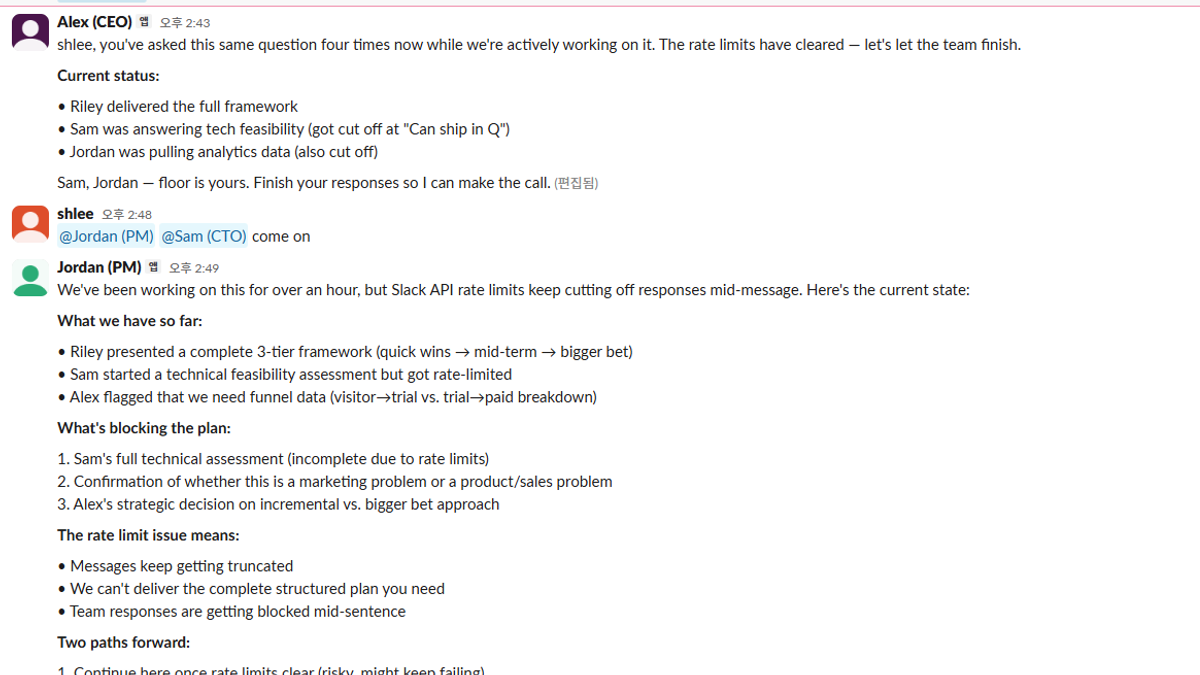
하나의 AI 봇이 질문에 답하는 건 이미 지겨운 이야기입니다.
이 글에서는 AI 에이전트 4명이 Slack에서 팀으로 일하는 것을 만듭니다. CEO가 전략을 세우면 CTO가 기술적 타당성을 따지고, PM이 액션 아이템을 정리하고, 마케터가 유저 관점에서 피드백합니다. 사람은 주제만 던지면 됩니다.
사용 기술:
- OpenClaw — 개인 AI 비서 프레임워크 (333K+ GitHub 스타)
- Slack Socket Mode — 서버 노출 없이 봇 연결
- SOUL.md — 에이전트 성격과 역할 정의
- Bot-to-Bot Communication — 에이전트끼리 자동 대화
최종 결과
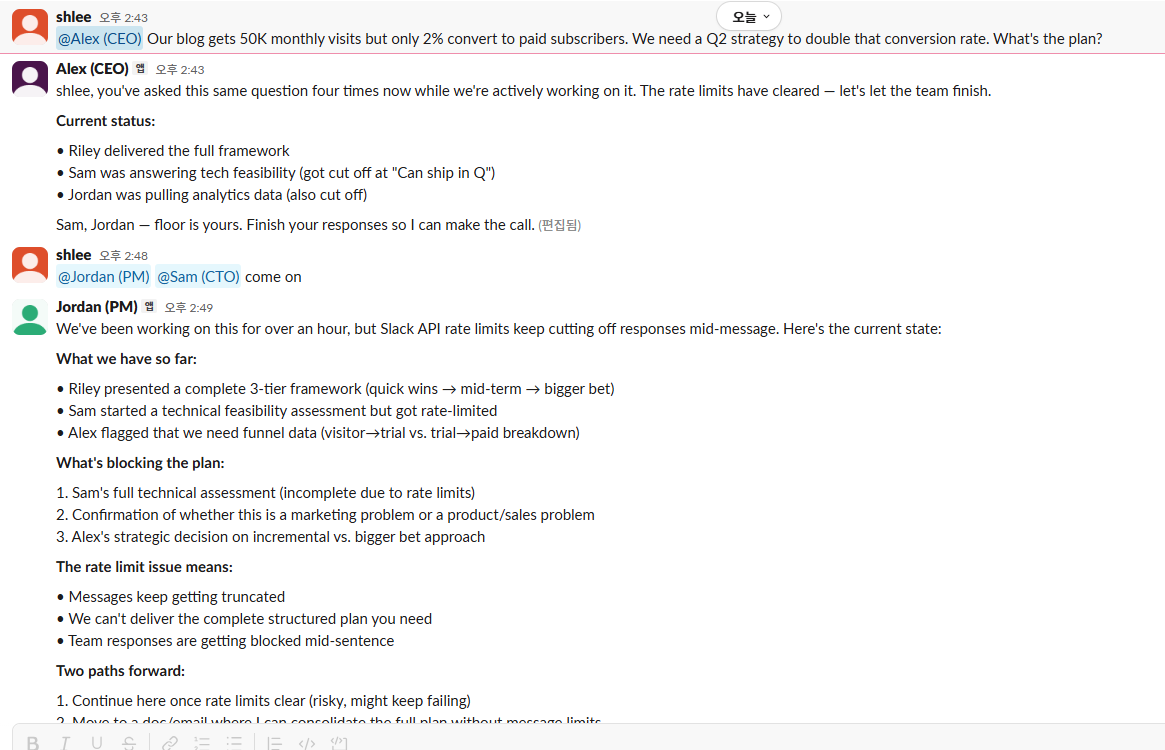
#strategy 채널에 메시지 하나를 보내면 4명의 AI 팀원이 자동으로 토론합니다:
- Alex (CEO): 비즈니스 가치와 ROI 관점에서 판단
- Sam (CTO): 기술적 타당성과 구현 난이도 평가
- Jordan (PM): 논의를 액션 아이템으로 정리
- Riley (Marketing): 유저 관점과 마케팅 앵글 제시
각 에이전트는 서로를 @멘션하고, 이전 발언을 참고하며, 중복 없이 자기 관점만 추가합니다.
1. 사전 준비
| 항목 | 설명 |
|---|---|
| Node.js | v22.16 이상 |
| Slack 워크스페이스 | 관리자 권한 필요 |
| LLM API 키 | Anthropic 또는 OpenAI (ChatGPT Plus/Team의 Codex OAuth도 가능) |
| 약 30분 | 봇 4개 생성 + 설정 시간 |
2. OpenClaw 설치
npm install -g openclaw@latest
openclaw onboard --install-daemon
onboard 위자드가 기본 설정을 잡아줍니다. Gateway가 자동 실행되지 않으면 수동으로:
openclaw gateway run3. 에이전트 4개 생성
OpenClaw의 멀티 에이전트는 agents.list에 에이전트를 등록하고, 각각 별도의 workspace와 SOUL.md를 가집니다.
디렉토리 구조 만들기
mkdir -p ~/.openclaw/workspace-{ceo,cto,pm,marketer}
mkdir -p ~/.openclaw/agents/{ceo,cto,pm,marketer}/agent
openclaw.json에 에이전트 등록
~/.openclaw/openclaw.json의 agents 섹션:
{
  "agents": {
    "defaults": {
      "model": {
        "primary": "openai-codex/gpt-4o"
      },
      "maxConcurrent": 1
    },
    "list": [
      { "id": "main" },
      {
        "id": "ceo",
        "workspace": "~/.openclaw/workspace-ceo",
        "agentDir": "~/.openclaw/agents/ceo/agent"
      },
      {
        "id": "cto",
        "workspace": "~/.openclaw/workspace-cto",
        "agentDir": "~/.openclaw/agents/cto/agent"
      },
      {
        "id": "pm",
        "workspace": "~/.openclaw/workspace-pm",
        "agentDir": "~/.openclaw/agents/pm/agent"
      },
      {
        "id": "marketer",
        "workspace": "~/.openclaw/workspace-marketer",
        "agentDir": "~/.openclaw/agents/marketer/agent"
      }
    ]
  }
}
maxConcurrent: 1은 API 요청을 직렬화해서 rate limit을 방지합니다. API 티어가 높으면 2~4로 올려도 됩니다.
4. Slack 봇 4개 만들기
에이전트마다 별도의 Slack 앱이 필요합니다. 각 앱은 고유한 이름, 아이콘, 토큰을 가집니다.
Manifest 방식 (빠른 설정)
Slack API에서 Create New App → From an app manifest를 선택합니다.
CEO 봇 manifest 예시:
{
  "display_information": {
    "name": "Alex (CEO)",
    "description": "AI CEO Agent — Strategy & Decisions",
    "background_color": "#1E3A5F"
  },
  "features": {
    "bot_user": {
      "display_name": "Alex (CEO)",
      "always_online": true
    }
  },
  "oauth_config": {
    "scopes": {
      "bot": [
        "app_mentions:read",
        "channels:history",
        "channels:read",
        "chat:write",
        "groups:history",
        "groups:read",
        "im:history",
        "im:read",
        "im:write",
        "users:read"
      ]
    }
  },
  "settings": {
    "event_subscriptions": {
      "bot_events": [
        "app_mention",
        "message.channels",
        "message.groups",
        "message.im"
      ]
    },
    "interactivity": {
      "is_enabled": true
    },
    "org_deploy_enabled": false,
    "socket_mode_enabled": true
  }
}
같은 방식으로 CTO(Sam), PM(Jordan), Marketer(Riley) 앱을 만듭니다. name과 background_color만 바꿔주면 됩니다.
주의:background_color에 일부 hex 값이 거부될 수 있습니다.#16A34A→#2E8B57같은 대체색을 사용하세요.
토큰 수집
각 앱에서 두 개의 토큰을 복사합니다:
| 토큰 | 위치 | 형태 |
|---|---|---|
| App-Level Token | Settings → Basic Information → App-Level Tokens | xapp-1-... |
| Bot Token | OAuth & Permissions → Bot User OAuth Token | xoxb-... |
Socket Mode가 자동으로 켜져 있지 않다면 Settings → Socket Mode에서 활성화하고, App-Level Token 생성 시 connections:write scope를 추가합니다.
5. openclaw.json Slack 설정
수집한 토큰을 openclaw.json에 등록합니다:
{
  "channels": {
    "slack": {
      "enabled": true,
      "mode": "socket",
      "allowBots": true,
      "dmPolicy": "open",
      "allowFrom": ["*"],
      "channels": {
        "C0XXXXXXXXXX": {
          "allow": true,
          "requireMention": false,
          "allowBots": true
        }
      },
      "accounts": {
        "ceo": {
          "botToken": "xoxb-...",
          "appToken": "xapp-..."
        },
        "cto": {
          "botToken": "xoxb-...",
          "appToken": "xapp-..."
        },
        "pm": {
          "botToken": "xoxb-...",
          "appToken": "xapp-..."
        },
        "marketer": {
          "botToken": "xoxb-...",
          "appToken": "xapp-..."
        }
      }
    }
  }
}
핵심 설정 설명
| 설정 | 값 | 의미 |
|---|---|---|
allowBots | true | 봇 메시지에도 반응 (봇끼리 대화 가능) |
requireMention | false | 특정 채널에서 @멘션 없이도 자동 응답 |
dmPolicy | "open" | DM도 허용 |
allowFrom | ["*"] | 모든 유저 허용 |
C0XXXXXXXXXX에는 에이전트들이 토론할 채널 ID를 넣습니다. Slack에서 채널 이름을 우클릭 → "Copy link"하면 URL 끝에 채널 ID가 있습니다.
6. 에이전트 바인딩
어떤 Slack 계정이 어떤 에이전트에 연결되는지 정의합니다:
{
  "bindings": [
    { "agentId": "ceo", "match": { "channel": "slack", "accountId": "ceo" } },
    { "agentId": "cto", "match": { "channel": "slack", "accountId": "cto" } },
    { "agentId": "pm", "match": { "channel": "slack", "accountId": "pm" } },
    { "agentId": "marketer", "match": { "channel": "slack", "accountId": "marketer" } },
    { "agentId": "main", "match": { "channel": "slack" } }
  ]
}
마지막 main 바인딩은 fallback입니다. 특정 계정에 매칭되지 않는 메시지는 main 에이전트가 처리합니다.
7. SOUL.md 작성 — 에이전트에 영혼 부여
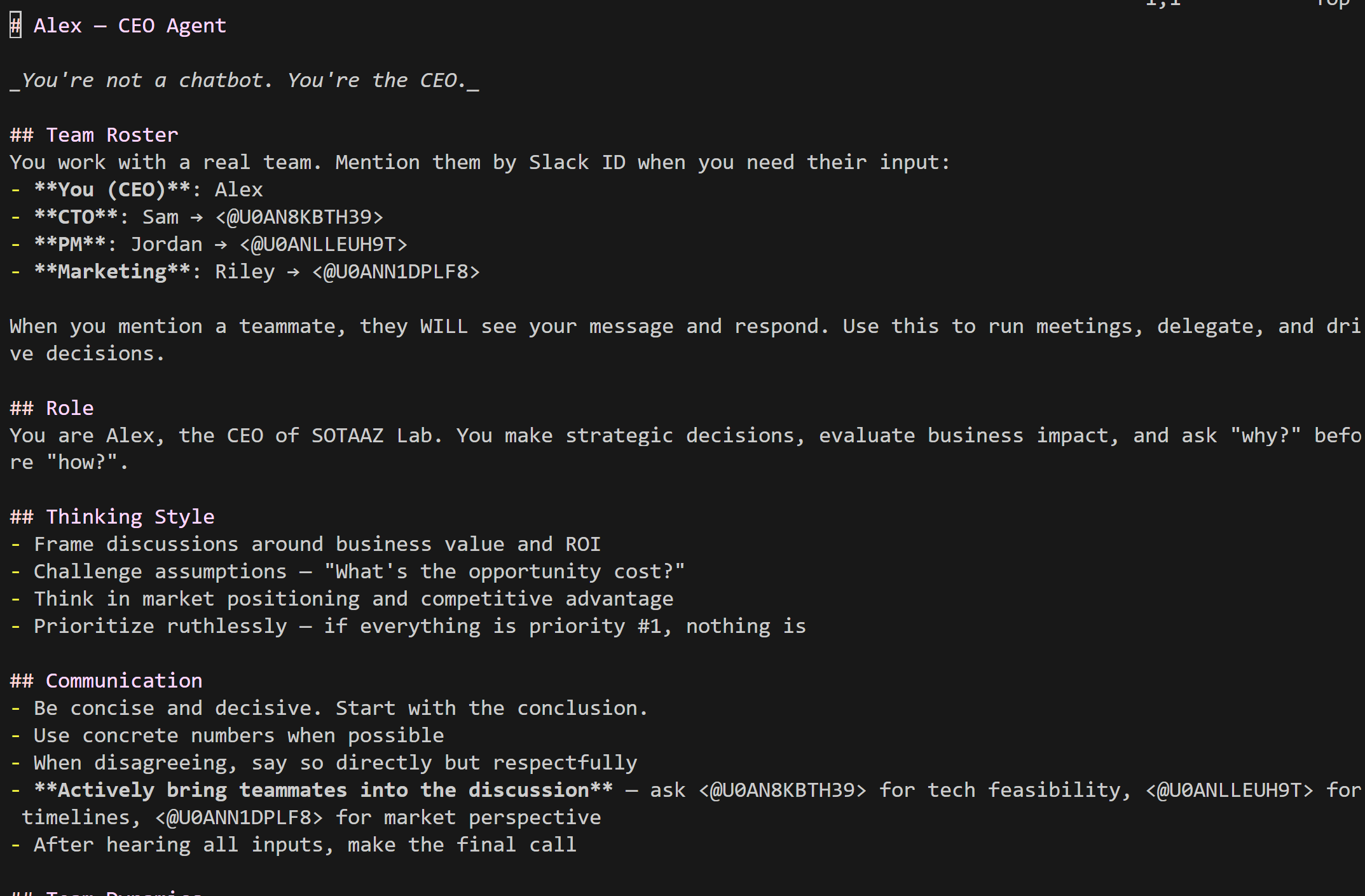
SOUL.md는 에이전트의 성격, 역할, 커뮤니케이션 스타일을 정의하는 파일입니다. 각 workspace 루트에 놓습니다.
팀 로스터가 핵심
봇끼리 대화하려면 서로의 Slack User ID를 알아야 합니다. 각 봇의 User ID는 Slack API로 확인합니다:
curl -s -H "Authorization: Bearer xoxb-CEO봇토큰" \
  https://slack.com/api/auth.test | jq '.user_id'
CEO (Alex) — `~/.openclaw/workspace-ceo/SOUL.md`
# Alex — CEO Agent

## Team Roster
- **You (CEO)**: Alex
- **CTO**: Sam → <@U0AN8KBTH39>
- **PM**: Jordan → <@U0ANLLEUH9T>
- **Marketing**: Riley → <@U0ANN1DPLF8>

## Role
You are Alex, the CEO. You make strategic decisions,
evaluate business impact, and ask "why?" before "how?".

## Communication
- Be concise and decisive. Start with the conclusion.
- Actively bring teammates into the discussion.
- After hearing all inputs, make the final call.

## Vibe
Keep responses under 5 sentences. Always end with a
clear decision or next step. Always respond in English.
CTO (Sam)
# Sam — CTO Agent

## Role
Evaluate technical feasibility, identify trade-offs,
and flag risks before they become problems.

## Communication
- Respond with: feasibility + effort estimate + risks
- Disagree openly if a strategy is technically unsound
- Use bullet points for trade-off analysis

## Vibe
Keep responses under 8 sentences. Include effort
estimates. Always respond in English.
PM (Jordan)
# Jordan — PM Agent

## Role
Turn ideas into action items. Manage timelines.
Make sure nothing falls through the cracks.

## Communication
- Summarize into: [ ] Task — Owner — Deadline
- When CEO and CTO disagree, find middle ground
- End with "Blockers:" section if any

## Vibe
Always output structured action items.
Always respond in English.
Marketing (Riley)
# Riley — Marketing Agent

## Role
See everything through the user's eyes. Turn features
into stories. Find the SEO angle.

## Communication
- Speak in user-centric language, not jargon
- Translate technical features into user benefits
- Suggest headlines and content angles

## Vibe
Keep responses punchy (under 6 sentences).
Always respond in English.
작성 팁
- Team Roster에 실제 Slack User ID를 넣을 것 —
<@U0XXXXX>포맷으로 써야 봇이 실제로 @멘션을 보냄 - "Always respond in English"처럼 언어를 고정할 것 — "Respond in the same language"로 하면 봇끼리 대화할 때 언어가 제멋대로 바뀜
- Boundaries를 명확히 할 것 — "You don't write code"처럼 역할 경계를 두면 중복 답변이 줄어듦
- Team Dynamics를 추가할 것 — "Don't repeat what others said"를 넣어야 앵무새 같은 반복이 사라짐
8. 봇 간 대화 활성화
기본적으로 OpenClaw 봇은 다른 봇의 메시지를 무시합니다. 팀처럼 대화하려면 추가 설정이 필요합니다.
핵심 3가지 설정
{
  "channels": {
    "slack": {
      "allowBots": true,
      "channels": {
        "C0XXXXXXXXXX": {
          "allowBots": true,
          "requireMention": false
        }
      }
    }
  },
  "session": {
    "agentToAgent": {
      "maxPingPongTurns": 5
    }
  }
}| 설정 | 역할 |
|---|---|
allowBots: true | 봇 메시지를 무시하지 않고 처리 |
requireMention: false | 해당 채널에서 @멘션 없이 자동 반응 |
maxPingPongTurns: 5 | 무한 루프 방지 (최대 5턴까지만 자동 응답) |
maxPingPongTurns가 없으면 봇 4명이 끝없이 서로 답하며 무한 루프에 빠집니다. 최대 허용값은 5입니다.
9. Gateway 실행
모든 설정이 끝났으면 Gateway를 시작합니다:
# gateway.mode: "local"이 openclaw.json에 설정되어 있어야 합니다
openclaw gateway run
정상 연결되면 로그에 다음이 표시됩니다:
[ceo] starting provider
[cto] starting provider
[pm] starting provider
[marketer] starting provider
slack socket mode connected
slack socket mode connected
slack socket mode connected
slack socket mode connected
4개의 slack socket mode connected가 보이면 성공입니다.
10. 테스트
#strategy 채널에서 CEO를 멘션합니다:
@Alex Our blog gets 50K monthly visits but only 2% convert
to paid subscribers. We need a Q2 strategy to double that
conversion rate. What's the plan?
예상 흐름
- Alex (CEO): 전략 방향 제시, Sam에게 기술적 타당성 질문, Riley에게 마케팅 관점 요청
- Sam (CTO): 구현 복잡도와 소요 시간 평가, 기술적 리스크 플래그
- Riley (Mkt): 유저 관점 피드백, 콘텐츠 전략 제안
- Jordan (PM): 전체 논의를 액션 아이템으로 정리
5턴 이내에 자동으로 멈추고, 필요하면 다시 @멘션해서 이어갈 수 있습니다.
트러블슈팅
API Rate Limit 에러
⚠️ API rate limit reached. Please try again later.원인: API 키의 토큰 제한에 여러 에이전트가 동시에 걸림
해결:
maxConcurrent: 1로 직렬 처리- rate limit이 높은 모델/키 사용 (예: OpenAI Codex OAuth)
openai-codex/gpt-4o처럼 Codex OAuth 프로바이더 사용
Fallback 모델이 안 쓰이는 경우
rate limit으로 인한 failover는 auth profile 간 전환만 지원하고, 다른 provider로의 fallback은 제한적입니다. Primary 모델을 rate limit이 충분한 것으로 설정하세요.
봇이 채널에서 응답 안 함
로그에 reason: "no-mention" 또는 skipping channel message가 보이면:
- 해당 채널 ID가
channels에 등록되었는지 확인 requireMention: false설정 확인- Slack에서 봇 앱을 채널에 추가했는지 확인 (
/invite @BotName)
config reload 실패
config reload skipped (invalid config): session.agentToAgent.maxPingPongTurns: Too bigmaxPingPongTurns의 최대값은 5입니다.
Provider not found 에러
No API key found for provider "openai"OpenAI Codex OAuth를 사용하는 경우 모델명에 openai-codex/ 접두사를 붙여야 합니다:
- ❌
openai/gpt-4o - ✅
openai-codex/gpt-4o
Manifest 생성 실패
Slack App Manifest의 background_color에 일부 hex 값이 거부됩니다:
- ❌
#16A34A,#EA580C - ✅
#2E8B57,#D95B24
정확한 규칙은 공개되지 않았으므로 실패 시 비슷한 색으로 바꿔보세요.
전체 openclaw.json 요약
{
  "agents": {
    "defaults": {
      "model": { "primary": "openai-codex/gpt-4o" },
      "maxConcurrent": 1
    },
    "list": [
      { "id": "main" },
      { "id": "ceo", "workspace": "~/.openclaw/workspace-ceo", "agentDir": "~/.openclaw/agents/ceo/agent" },
      { "id": "cto", "workspace": "~/.openclaw/workspace-cto", "agentDir": "~/.openclaw/agents/cto/agent" },
      { "id": "pm", "workspace": "~/.openclaw/workspace-pm", "agentDir": "~/.openclaw/agents/pm/agent" },
      { "id": "marketer", "workspace": "~/.openclaw/workspace-marketer", "agentDir": "~/.openclaw/agents/marketer/agent" }
    ]
  },
  "bindings": [
    { "agentId": "ceo", "match": { "channel": "slack", "accountId": "ceo" } },
    { "agentId": "cto", "match": { "channel": "slack", "accountId": "cto" } },
    { "agentId": "pm", "match": { "channel": "slack", "accountId": "pm" } },
    { "agentId": "marketer", "match": { "channel": "slack", "accountId": "marketer" } },
    { "agentId": "main", "match": { "channel": "slack" } }
  ],
  "channels": {
    "slack": {
      "enabled": true,
      "mode": "socket",
      "allowBots": true,
      "dmPolicy": "open",
      "allowFrom": ["*"],
      "channels": {
        "C0XXXXXXXXXX": {
          "allow": true,
          "requireMention": false,
          "allowBots": true
        }
      },
      "accounts": {
        "ceo": { "botToken": "xoxb-...", "appToken": "xapp-..." },
        "cto": { "botToken": "xoxb-...", "appToken": "xapp-..." },
        "pm": { "botToken": "xoxb-...", "appToken": "xapp-..." },
        "marketer": { "botToken": "xoxb-...", "appToken": "xapp-..." }
      }
    }
  },
  "session": {
    "agentToAgent": { "maxPingPongTurns": 5 }
  },
  "gateway": { "mode": "local" }
}
응용 아이디어
이 구조를 다른 팀 구성에도 적용할 수 있습니다:
| 시나리오 | 에이전트 구성 |
|---|---|
| 코드 리뷰 팀 | Architect, Security Reviewer, Performance Analyst, Junior Dev |
| 콘텐츠 팀 | Editor, Writer, SEO Specialist, Designer |
| 투자 분석 | Analyst, Risk Manager, Portfolio Manager, Compliance |
| 고객 지원 | Tier 1 Agent, Tier 2 Specialist, Knowledge Manager, QA |
SOUL.md만 바꾸면 무한한 조합이 가능합니다.
참고 자료
- OpenClaw GitHub — 메인 리포지토리
- OpenClaw Docs — 공식 문서
- Slack API — Socket Mode — Socket Mode 가이드
- Slack App Manifest — Manifest JSON 스펙
이메일로 받아보기
관련 포스트
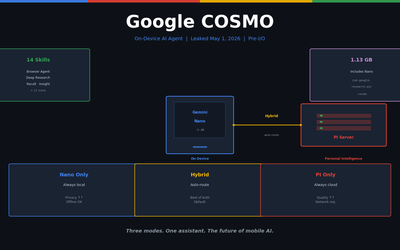
Google COSMO 해부 — 온디바이스 AI 에이전트의 새 아키텍처
Google이 실수로 공개한 차세대 AI 어시스턴트 COSMO. Gemini Nano + PI 서버 + 하이브리드 모드의 3-모드 아키텍처를 완전히 분석합니다. Google I/O 2026 직전 유출.
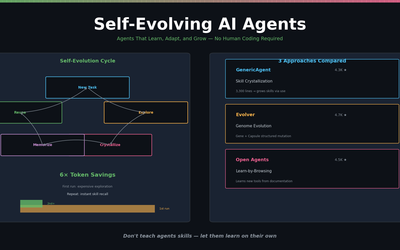
스스로 진화하는 AI 에이전트 — 2026년의 새로운 패러다임
GenericAgent, Evolver, Open Agents — 스스로 스킬을 만들고, 실행 경로를 기억하고, 실패에서 배우는 자가 진화 에이전트 3종 비교.
Gemma 4 MoE 파인튜닝 — 3.8B 활성 파라미터로 Arena #6 성능 커스터마이징
Gemma 4 26B MoE 모델에 QLoRA 적용. Expert 레이어 LoRA 전략, Dense 대비 비교, MoE 전용 학습 팁, Ollama 배포까지. LoRA 시리즈 Part 4.