Stitch MCP vs Figma MCP — Which Design-to-Code MCP Should You Use?
Full comparison of Google Stitch MCP and Figma MCP (official + Framelink) — tools, pricing, output quality, and real-world use cases. Stitch generates designs from text; Figma MCP reads existing designs. Here's how to choose.
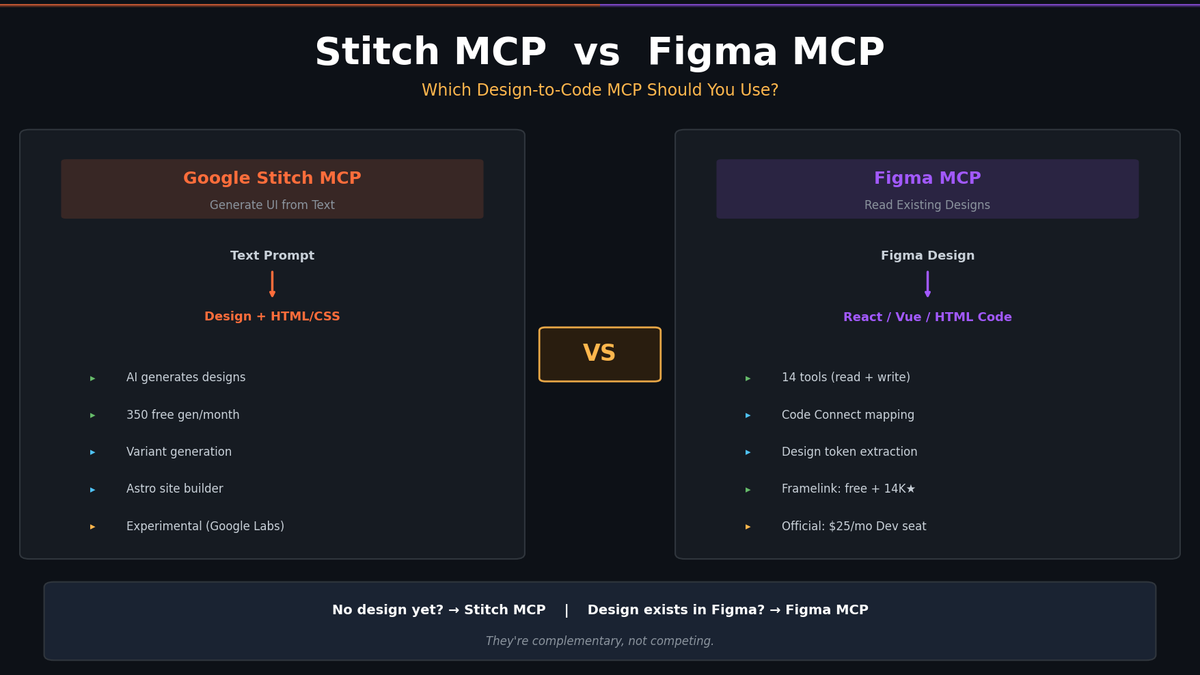
Stitch MCP vs Figma MCP — Which Design-to-Code MCP Should You Use?
Google Stitch MCP and Figma MCP both connect design tools to AI coding agents via the Model Context Protocol. But they solve fundamentally different problems.
Stitch MCP generates new UI designs from text prompts and outputs HTML/CSS. Figma MCP reads existing Figma designs and feeds structured data to your coding agent for code generation.
This comparison covers tools, pricing, platform support, output quality, and the real decision: when to use which.
TL;DR — Quick Decision Table
| Stitch MCP | Figma MCP (Official) | Framelink (Community) | |
|---|---|---|---|
| What it does | Generate UI from text → HTML/CSS | Read/write Figma designs → code context | Read Figma designs → simplified data |
| Direction | Text → Design + Code | Design → Code (+ Code → Design) | Design → Code |
| Design source | AI-generated (Gemini 2.5 Pro) | Human-made Figma files | Human-made Figma files |
| Price | Free (preview) | Free tier: 6 calls/mo; Full: Dev seat ($25/mo) | Free (MIT) |
| Best for | Prototyping from scratch | Pixel-perfect implementation of existing designs | Budget-friendly Figma → code |
If you have Figma designs already, use Figma MCP. If you're starting from zero and want AI to design for you, use Stitch MCP. They're complementary, not competing.
What Each Tool Actually Does
Stitch MCP — AI Generates the Design
Stitch is an experimental tool from Google Labs. You describe a UI in text, Stitch generates both a visual design and the HTML/CSS code.
The MCP server (@_davideast/stitch-mcp) wraps the Stitch API so AI agents can call it as a tool. In practice:
You: "Build a SaaS pricing page with 3 tiers"
Agent → calls Stitch MCP → generates design + HTML/CSS
Agent → returns the code to your project
There's no Figma file, no designer involved. The AI creates the design from scratch.
Available MCP tools:
| Tool | What it does |
|---|---|
generate_screen_from_text | Generate a new screen from a text prompt |
get_screen_code | Get HTML/CSS of a generated screen |
get_screen_image | Get a screenshot (base64) |
build_site | Map screens to routes, get per-page HTML |
extract_design_context | Extract "design DNA" (colors, fonts, layout) for consistency |
list_projects / list_screens | Browse existing projects and screens |
The official SDK (@google/stitch-sdk) adds edit() for iterative changes and variants() for generating 1-5 design variations with configurable creative range.
Figma MCP (Official) — Reads Your Figma Files
Figma's first-party MCP server connects your existing Figma designs to AI coding agents. The agent reads your design, understands the layout, tokens, and components, then generates code that matches.
You: "Implement this Figma design" + paste Figma URL
Agent → calls Figma MCP → reads design structure, variables, screenshots
Agent → generates React/Vue/HTML code matching the design
Available MCP tools (14 total):
| Tool | What it does |
|---|---|
get_design_context | Returns structured code representation (default: React + Tailwind) |
get_variable_defs | Returns design tokens — colors, spacing, typography |
get_screenshot | Takes a screenshot for layout fidelity |
get_metadata | Returns XML with properties (IDs, names, types, positions) |
use_figma | Write back to canvas — create, edit, delete objects |
generate_figma_design | Capture a web page into a Figma design |
create_new_file | Create a blank Figma file |
generate_diagram | Generate FigJam diagrams from Mermaid syntax |
search_design_system | Search connected design libraries |
get_code_connect_map | Map Figma nodes to code components |
| + 4 more | Code Connect suggestions, confirmations, rules, FigJam |
The official server is remote-hosted at https://mcp.figma.com/mcp — no local installation needed. Authentication is OAuth through your browser.
Framelink (Community) — Lightweight Figma Reader
Framelink is a community-built alternative with 14,000+ GitHub stars. It predates the official Figma MCP by 6 months and was originally built for Cursor.
Only 2 tools, but they're focused:
| Tool | What it does |
|---|---|
get_figma_data | Fetch and simplify design data (YAML/JSON) |
download_figma_images | Download image assets (PNG, SVG, GIF) to local directory |
It's read-only, free, and MIT-licensed. Uses a personal access token instead of OAuth.
Head-to-Head Comparison
Authentication & Setup
| Stitch MCP | Figma MCP (Official) | Framelink | |
|---|---|---|---|
| Auth method | OAuth via gcloud | OAuth via browser | Personal access token |
| Setup | npx @_davideast/stitch-mcp init | Add remote URL in editor | npx figma-developer-mcp |
| Prerequisites | Node.js 18+, Google Cloud project, gcloud CLI | Figma account with appropriate seat | Figma account + API token |
| Config | npx ... proxy (stdio) | https://mcp.figma.com/mcp (HTTP) | npx ... (stdio) |
Stitch MCP has the most complex setup — you need a Google Cloud project with billing enabled, gcloud authentication, and the Stitch API enabled. The init wizard automates most of it, but it's still more steps than Figma MCP's OAuth-and-go approach.
Figma MCP (official) is the simplest: point your editor at the remote URL and authenticate through your browser.
Pricing
| Stitch MCP | Figma MCP (Official) | Framelink | |
|---|---|---|---|
| Base cost | Free (preview period) | Free tier available | Free (MIT) |
| Free limits | 350 Standard + 50 Experimental generations/mo | 6 tool calls/month | Figma API rate limits |
| Full access | Free (for now) | Dev seat: $25/mo per editor | Free |
| Future cost | Unknown (experimental) | Write features will be paid | Free |
Key points:
- Stitch MCP is generous during preview — 350 standard generations per month is a lot. But it's experimental with no guaranteed future pricing.
- Figma MCP (official) free tier is practically unusable at 6 calls/month. You need a Dev or Full seat ($25/mo) for real usage. Plus, write-to-canvas features (
use_figma) will become paid after beta. - Framelink is completely free with no artificial limits beyond Figma's standard API rate limits.
Platform Support
All three support the major AI coding platforms:
| Platform | Stitch MCP | Figma MCP (Official) | Framelink |
|---|---|---|---|
| Claude Code | Yes | Yes | Yes |
| Cursor | Yes | Yes | Yes (optimized) |
| VS Code (Copilot) | Yes | Yes | Yes |
| Gemini CLI | Yes | Yes | Yes |
| Windsurf | Yes | Yes | Yes |
| Claude Desktop | Yes | Yes | Yes |
| Codex CLI | Yes | Limited | Yes |
Output Format
| Stitch MCP | Figma MCP (Official) | Framelink | |
|---|---|---|---|
| Primary output | HTML/CSS code + screenshot | React + Tailwind (customizable) | Simplified YAML/JSON |
| Framework support | HTML/CSS only (static) | Any framework via prompts | Framework-agnostic data |
| Design tokens | Via extract_design_context | Via get_variable_defs | Embedded in output |
| Screenshots | Base64 images | Figma screenshots | No |
| Full site generation | Yes (Astro via CLI) | No | No |
Stitch MCP outputs raw HTML/CSS — not React components, not Vue, just static HTML with embedded CSS. Your agent can then convert this to framework-specific code, but the initial output is always vanilla HTML/CSS.
Figma MCP (official) defaults to React + Tailwind but can be prompted to generate any framework's code representation. The output quality depends heavily on how well the Figma file is structured.
Framelink doesn't generate code at all — it provides simplified design data that your LLM interprets and converts to code. This is surprisingly effective because modern LLMs are good at translating structured layout data into framework code.
Write Capability
| Stitch MCP | Figma MCP (Official) | Framelink | |
|---|---|---|---|
| Create designs | Yes (AI-generated) | Yes (use_figma, generate_figma_design) | No |
| Edit existing | Yes (via SDK edit()) | Yes (use_figma) | No |
| Generate variants | Yes (1-5 with creative range) | No | No |
| Generate diagrams | No | Yes (FigJam from Mermaid) | No |
Known Issues (March 2026)
Stitch MCP:
- Critical proxy bug —
process.exit(0)kills the stdio MCP transport immediately. Multiple open issues (#161-170). This specifically affects Claude Code integration. .envfile conflicts can break the proxy- No design memory between screens — each generation is independent
- API key auth doesn't work for the MCP proxy (OAuth only)
Figma MCP (Official):
- Beta status — features may change
- Large selections can cause timeouts or incomplete responses
- Write features (
use_figma) will become paid - 6 calls/month on free tier is essentially unusable
Framelink:
- Read-only — can't write back to Figma
- Only 2 tools (vs 14+ in official)
- No screenshot capability
- Large files may be slow to process
Real-World Use Cases
Use Stitch MCP When:
- You're prototyping from scratch — no designer, no Figma files, just an idea
- You need quick UI mockups — "show me 3 variations of a pricing page"
- You're building MVP landing pages — generate and iterate fast
- Design consistency matters across screens — use
extract_design_contextto maintain a design system
Example workflow:
"Create a project called SaaS Dashboard"
→ "Generate a login page with email, password, and Google OAuth"
→ "Generate a dashboard with sidebar navigation and 4 stat cards"
→ "Extract design context from the login page"
→ "Generate a settings page matching the extracted design context"
→ "Build a site with login at /, dashboard at /dashboard, settings at /settings"
Use Figma MCP (Official) When:
- You have Figma designs from a designer — implement them pixel-perfect
- You need design token extraction — colors, spacing, typography as code variables
- You use Code Connect — map Figma components to your React/Vue components
- You need write-back capability — generate designs from web pages into Figma
Example workflow:
"Here's the Figma URL for the new checkout flow"
→ Agent reads design context, variables, screenshots
→ Agent generates React + Tailwind components matching the design
→ Agent uses Code Connect to map to existing component library
Use Framelink When:
- Budget is a concern — free with no call limits
- You're on Cursor — it was built for Cursor specifically
- You need to download image assets — Framelink saves directly to your project
- You want simplicity — 2 tools, personal access token, done
Use Stitch + Figma Together:
The most powerful setup is using both:
- Stitch MCP → generate initial designs from text prompts
- Export or recreate in Figma for refinement
- Figma MCP → read the refined designs and generate production code
Or use Stitch for rapid prototyping and Figma MCP for production implementation.
Comparison Summary
| Criteria | Winner | Why |
|---|---|---|
| Generating new designs | Stitch MCP | Only option that generates from text |
| Implementing existing designs | Figma MCP | Direct access to your Figma files |
| Free usage | Framelink | No limits, no cost, MIT license |
| Tool count | Figma MCP (Official) | 14 tools covering read + write |
| Setup simplicity | Figma MCP (Official) | Remote URL + OAuth, no local setup |
| Output quality | Depends | Stitch for mobile; Figma for design-system-heavy projects |
| Future-proofing | Figma MCP | Backed by Figma; Stitch is "experimental" |
| Community/ecosystem | Framelink | 14,000+ stars, MIT, 45+ releases |
| Write-back to design tool | Figma MCP (Official) | use_figma for full canvas control |
| Variant generation | Stitch MCP | Built-in 1-5 variants with creative range |
Bottom Line
Stitch MCP and Figma MCP aren't competing — they solve different problems.
- No design exists yet? → Stitch MCP. Let AI generate the design and code.
- Design exists in Figma? → Figma MCP (official for full features, Framelink for free).
- Building a full product? → Use both. Stitch for rapid prototyping, Figma MCP for production implementation.
The "which MCP should I use?" question really comes down to: do you already have a design, or do you need one created?
Links & Resources
- Stitch MCP (CLI): github.com/davideast/stitch-mcp
- Stitch SDK: github.com/google-labs-code/stitch-sdk
- Stitch Platform: stitch.withgoogle.com
- Figma MCP (Official): github.com/figma/mcp-server-guide
- Framelink MCP: github.com/GLips/Figma-Context-MCP
- Stitch MCP Setup Guide: sotaaz.com/post/stitch-mcp-guide-en
Subscribe to Newsletter
Related Posts
Mobile Claude Code: three approaches, and what actually works
Three ways to reach Claude Code from your phone — tmux + SSH, /remote-control, and server-based agents. The real fix isn't "mobile support" but decoupling compute from your device.
Build Your Own LLM Knowledge Base — A Karpathy-Style Knowledge System
Complete guide to building a permanent personal knowledge system with Obsidian + Claude Code. Wiki + Memory dual-axis architecture.
Why Karpathy's CLAUDE.md Got 48K Stars — And How to Write Your Own
One markdown file raised AI coding accuracy from 65% to 94%. Analyzing Karpathy's 4 rules and practical writing guide.